• No-Logs Policy
    • Servers in 105 Countries
    • Use on Multiple Devices
    • High-Speed VPN
    • Access Online Services Securely
    • VPN for Gaming
    • 30-Day Money-Back Guarantee
    • Explore All Features
    • About ExpressVPN
    Sign Up For ExpressVPN

    One subscription gives you access to a fast-growing suite of privacy and security tools that work seamlessly together to improve your digital life.

    View all products
    • Lightway VPN Protocol
    • Internet Kill Switch
    • Split Tunneling
    • Private, Encrypted DNS
    • Avoid ISP Throttling
    • Threat Manager
    • Ad Blocker
    • Parental Controls
    • Dedicated IP
    • Windows
    • MacOS
    • Linux
    • iPhone / iPad
    • Android
    • Apple TV
    • Fire Stick
    • Android TV
    • VPN for Routers
    • Aircove Routers
    • Chrome
    • Firefox
    • Edge
    • All Apps & Devices
  • Pricing
    • What Is a VPN?
    • VPN for Beginners
    • How To Use a VPN
    • VPN Encryption Explained
    • Blog
    • Glossary
    • IP Address Checker
    • DNS Leak Test
    • WebRTC Leak Test
    • Password Generator
    • Support Center
    • FAQ
    • Live Chat
    • VPN Setup Tutorials
    • Redemption Code
  • VPN for Teams
    • ExpressVPN

      ExpressVPN Industry-leading, ultra-fast VPN with secure servers in 105 countries.

    • ExpressMailGuard

      ExpressMailGuard Private email relay service to protect your inbox and identity.

    • ExpressKeys

      ExpressKeys Secure password management, multi-factor authentication, and more.

    • ExpressAI

      ExpressAI The first consumer AI powered by confidential computing for privacy-led intelligence.

    • Identity Defender

      Identity Defender Powerful suite of ID protection, monitoring, and data removal tools.

    • View All Products

    Other products from the family behind ExpressVPN

    • holiday.com eSIM

      holiday.com eSIM Unlimited data with a single eSIM across 150+ destinations.

    • Intego

      Intego Award-winning macOS antivirus, firewall, system tools, and more.

    ExpressVPN for Teams
    ExpressVPN for Teams

    Get fast, secure VPN protection for growing teams. Easy to deploy, simple to manage, built to scale.

  • My Account
  • รับ Aircove ตั้งค่า
  • เริ่มต้น
  • เริ่มต้น รับ Aircove ตั้งค่า
  • Explore ExpressVPN
    • Why ExpressVPN?
    • No-Logs Policy
    • Servers in 105 Countries
    • Use on Multiple Devices
    • High-Speed VPN
    • Access Online Services Securely
    • VPN for Gaming
    • 30-Day Money-Back Guarantee
    • Explore All Features
    • About ExpressVPN
    • VPN Security & Access Features
    • Lightway VPN Protocol
    • Internet Kill Switch
    • Split Tunneling
    • Private, Encrypted DNS
    • Avoid ISP Throttling
    • Threat Manager
    • Ad Blocker
    • Parental Controls
    • Dedicated IP
  • Download VPN
    • Desktop
    • Windows
    • MacOS
    • Linux
    • Mobile
    • iPhone / iPad
    • Android
    • TV & Streaming
    • Apple TV
    • Fire Stick
    • Android TV
    • Routers
    • VPN for Routers
    • Aircove Routers
    • Extensions
    • Chrome
    • Firefox
    • Edge
    • All Apps & Devices
  • Pricing
  • Resources
    • VPN Basics
    • What Is a VPN?
    • VPN for Beginners
    • How To Use a VPN
    • VPN Encryption Explained
    • Content Library
    • Blog
    • Glossary
    • Tools
    • IP Address Checker
    • DNS Leak Test
    • WebRTC Leak Test
    • Password Generator
    • Support
    • Support Center
    • FAQ
    • Live Chat
    • VPN Setup Tutorials
    • Redemption Code
  • VPN for Teams
  • Products
    • ExpressVPN

      ExpressVPN Industry-leading, ultra-fast VPN with secure servers in 105 countries.

    • ExpressMailGuard

      ExpressMailGuard Private email relay service to protect your inbox and identity.

    • ExpressKeys

      ExpressKeys Secure password management, multi-factor authentication, and more.

    • ExpressAI

      ExpressAI The first consumer AI powered by confidential computing for privacy-led intelligence.

    • Identity Defender

      Identity Defender Powerful suite of ID protection, monitoring, and data removal tools.

    • View All Products

    Other products from the family behind ExpressVPN

    • holiday.com eSIM

      holiday.com eSIM Unlimited data with a single eSIM across 150+ destinations.

    • Intego

      Intego Award-winning macOS antivirus, firewall, system tools, and more.

    ExpressVPN for Teams
    ExpressVPN for Teams

    Get fast, secure VPN protection for growing teams. Easy to deploy, simple to manage, built to scale.

  • My Account
Home Home » ฉันจะลบบัญชี ExpressVPN บนแอป Android ได้อย่างไร?

จัดการบัญชีของคุณ

ฉันจะลบบัญชี ExpressVPN บนแอป Android ได้อย่างไร?

อัปเดตล่าสุด: 15/01/2026

Share in FacebookShare in TwitterShare in WhatsappShare in TelegramShare by email

บทความนี้จะแสดงให้คุณเห็นวิธีการลบบัญชี ExpressVPN โปรดทราบว่าคุณต้องไปที่เว็บไซต์ ExpressVPN และลงชื่อเข้าใช้ด้วยบัญชีของคุณเพื่อทำการลบบัญชีดังกล่าว

คำแนะนำสำหรับมือถือ

ทำตามขั้นตอนต่อไปนี้ถ้าคุณใช้งานอุปกรณ์มือถือ อย่างเช่น โทรศัพท์ Android

ในการจะลบบัญชี ExpressVPN ของคุณ:

  1. ไปที่เว็บไซต์ ExpressVPN (www.expressvpn.com) และแตะที่Menu icon.
  2. แตะที่บัญชีของฉัน
  3. กรอกรหัสผ่านบัญชี ExpressVPN ของคุณและแตะที่ลงชื่อเข้าใช้
  4. แตะที่ Menu icon.  ตรงมุมขวาบนของหน้าจอ

  5. เลื่อนลงไปและแตะที่บัญชีและการเรียกเก็บเงิน

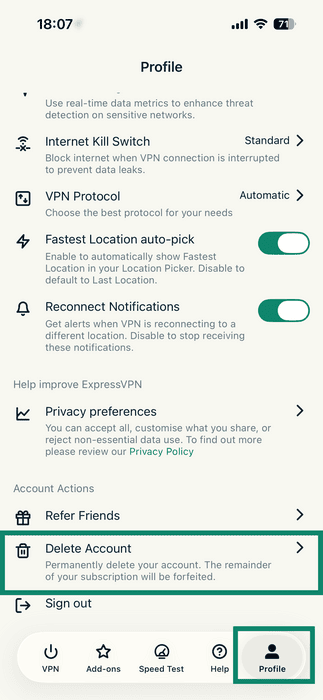
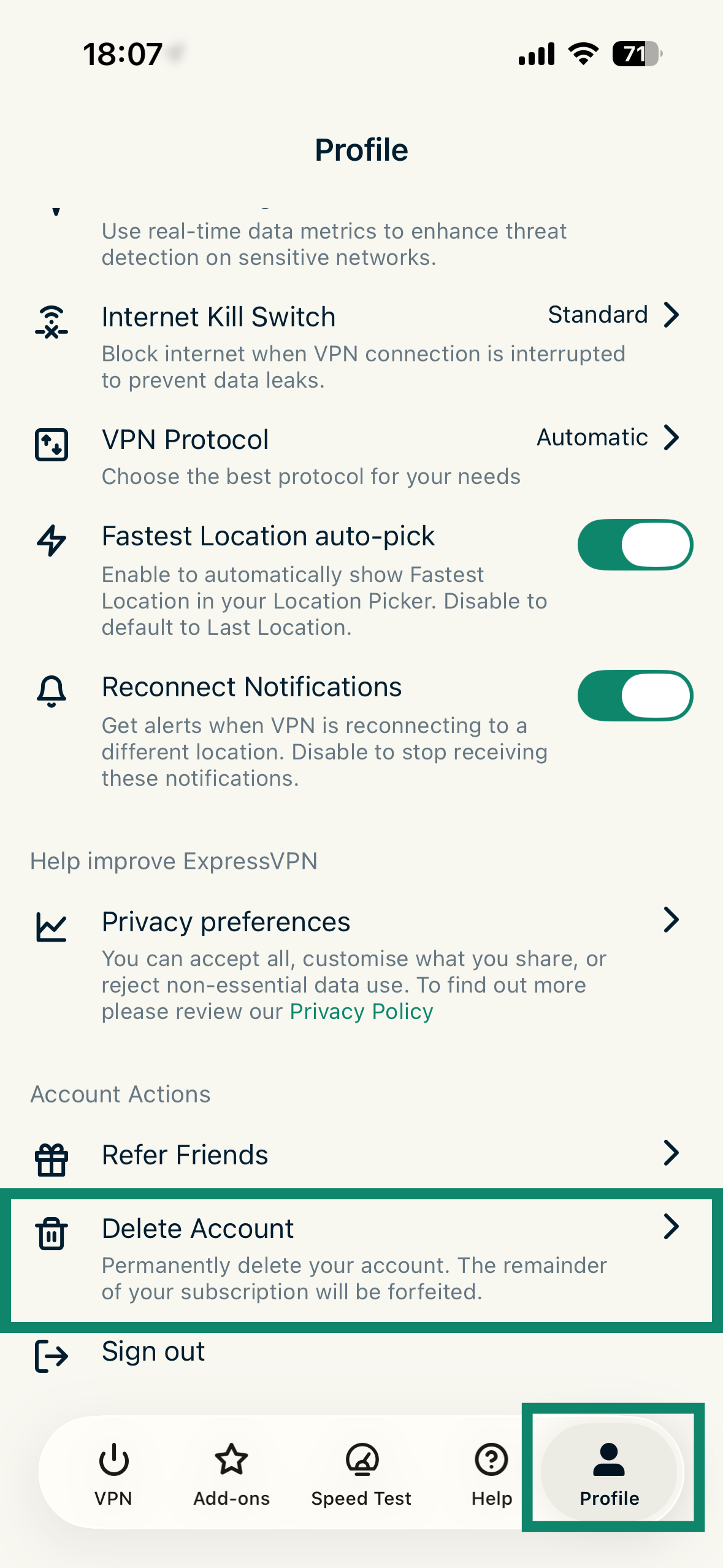
  6. เลื่อนลงไปที่การจัดการบัญชีและแตะที่ลบบัญชี

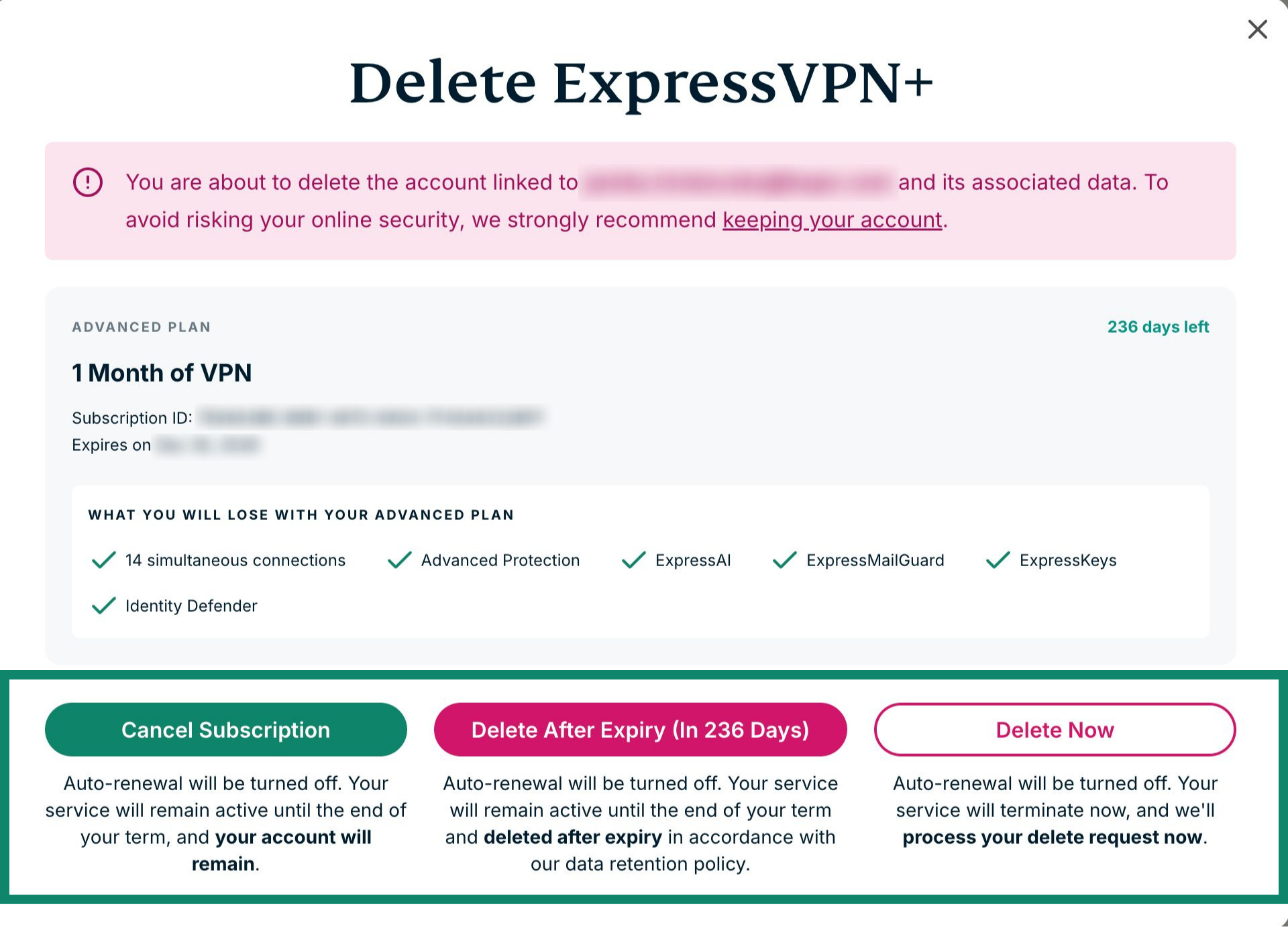
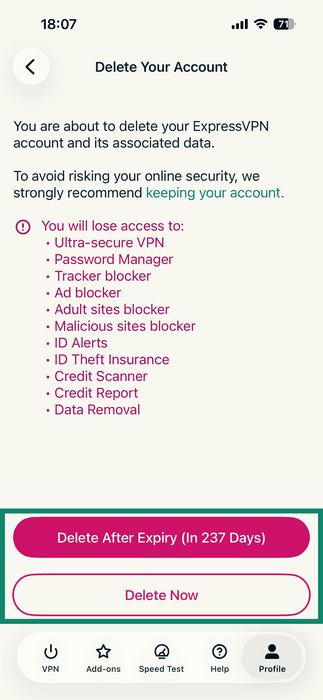
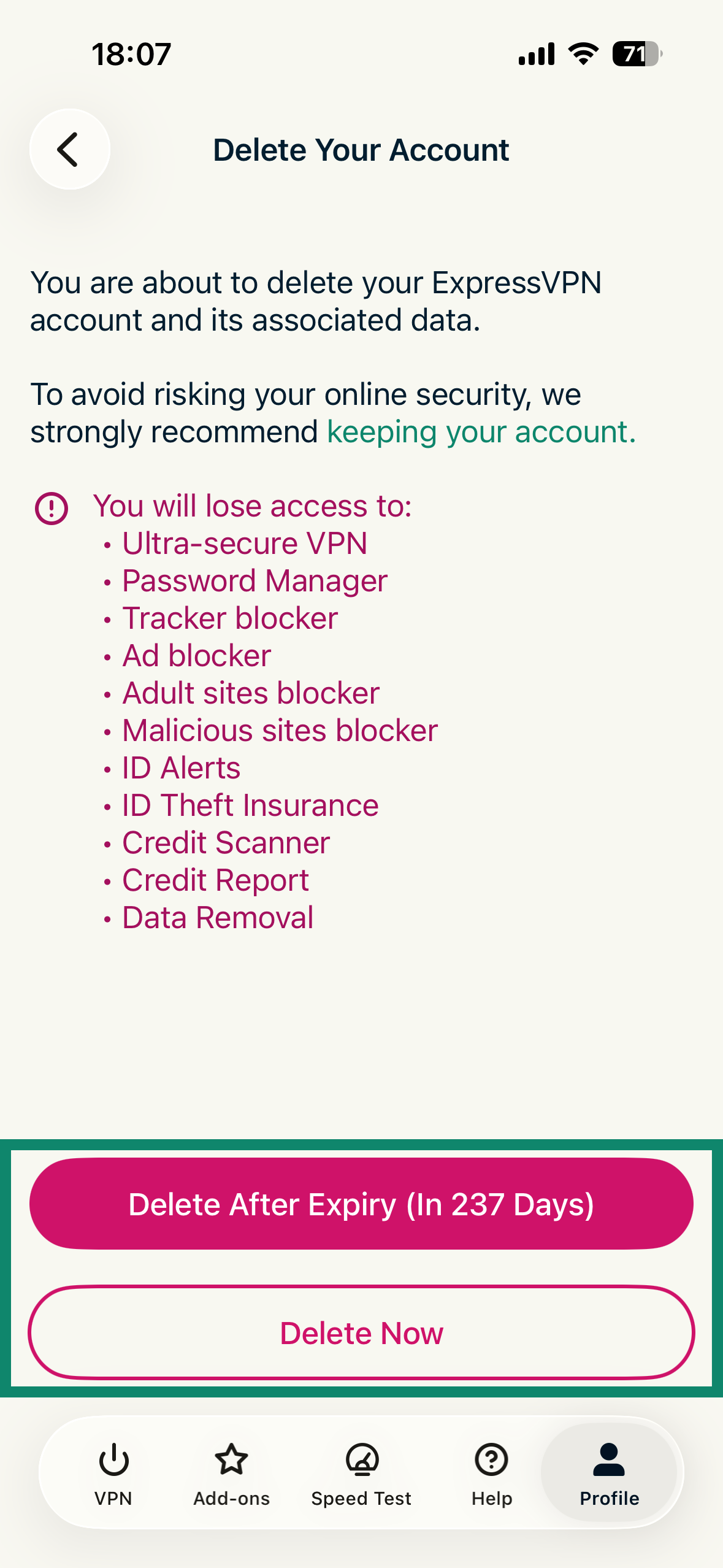
  7. ตรงนี้คุณจะมีสามตัวเลือก รายละเอียดตามด้านล่าง แตะเลือกลบหลังจากหมดอายุ (ใน xxx วัน) หรือลบตอนนี้เพื่อดำเนินการขั้นตอนลบบัญชีต่อ:
    • ยกเลิกการสมัครสมาชิก: การต่ออายุอัตโนมัติจะถูกปิด แต่บัญชีของคุณจะยังไม่ถูกลบ
    • ลบหลังจากหมดอายุ (ใน xxx วัน): การต่ออายุอัตโนมัติจะถูกปิด และบัญชีของคุณจะถูกลบหลังจากที่การสมัครสมาชิกของคุณหมดอายุ
    • ลบตอนนี้: การต่ออายุอัตโนมัติจะถูกปิด และบัญชีของคุณจะถูกลบในทันที
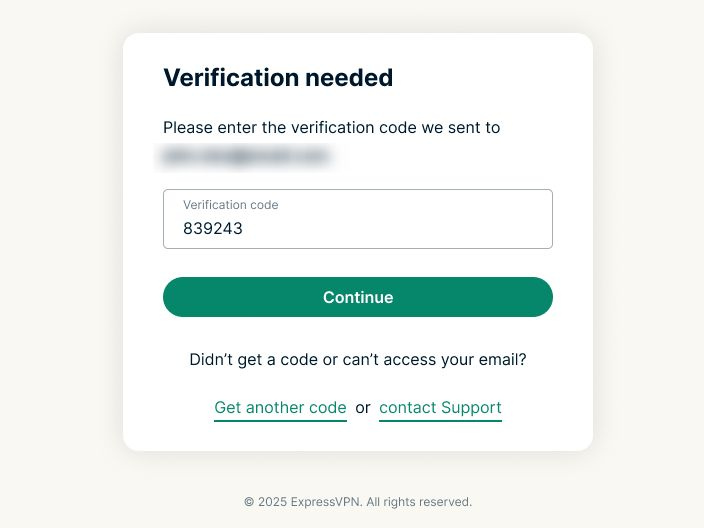
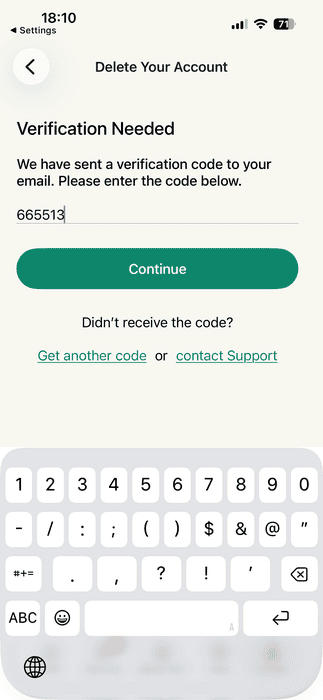
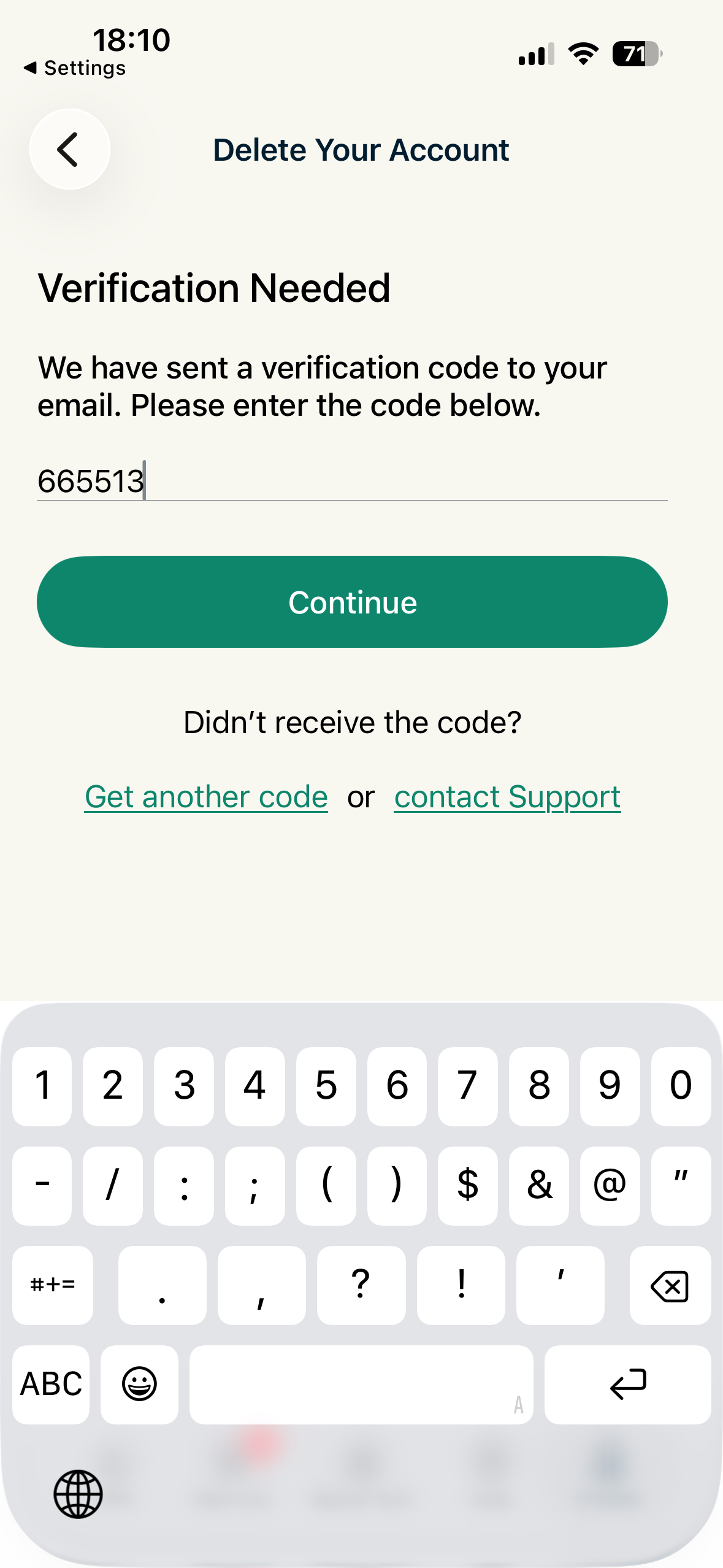
  8. คุณจะถูกขอให้ตรวจสอบคำร้องขอลบบัญชี ExpressVPN รหัสยืนยันจะถูกส่งไปยังที่อยู่อีเมลของคุณ กรอกรหัสในช่องที่ระบุไว้สำหรับรหัสยืนยัน จากนั้นแตะที่ดำเนินการต่อ
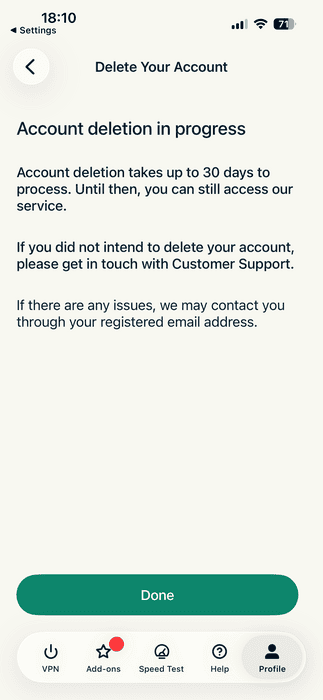
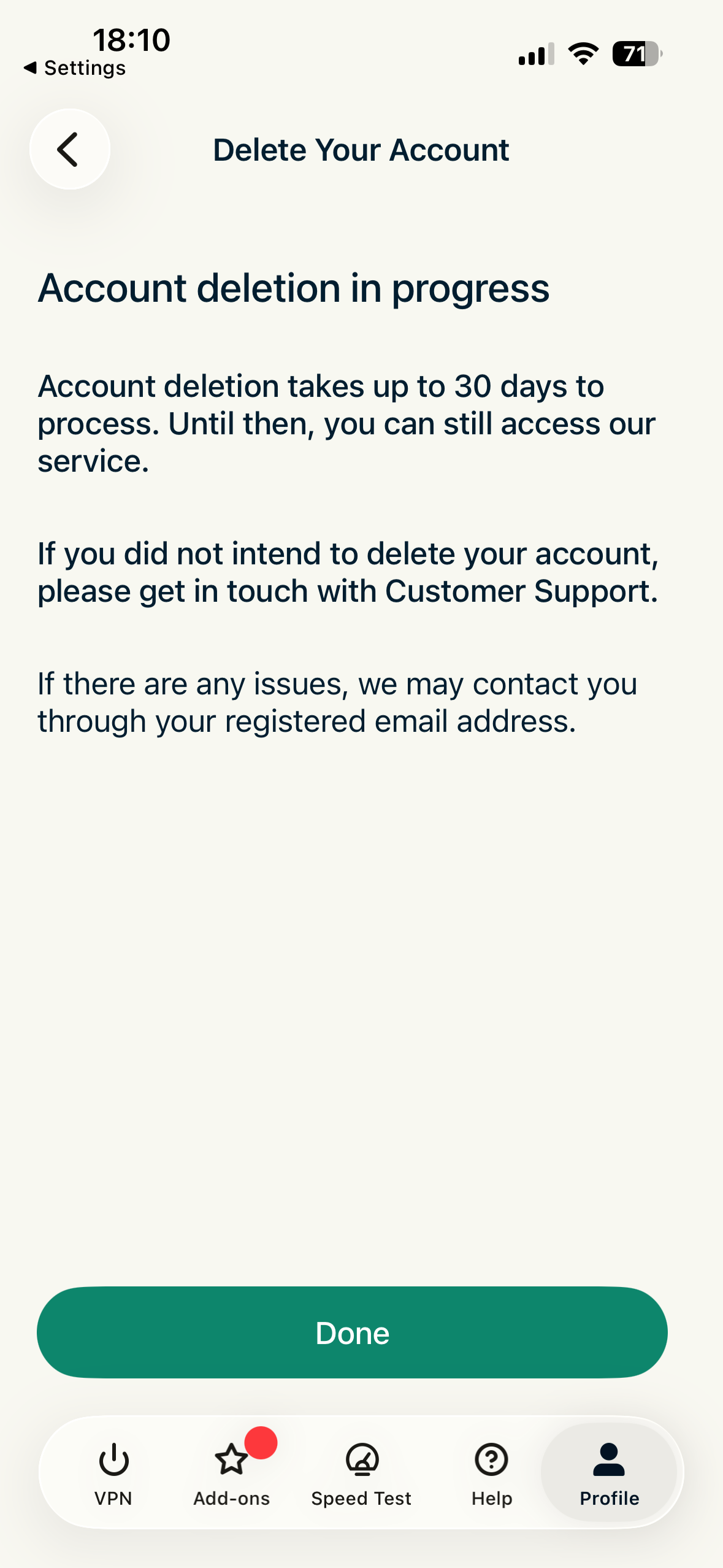
  9. คุณจะเห็นข้อความยืนยัน และคุณก็จะได้รับอีเมลยืนยันคำร้องขอลบบัญชีของคุณ
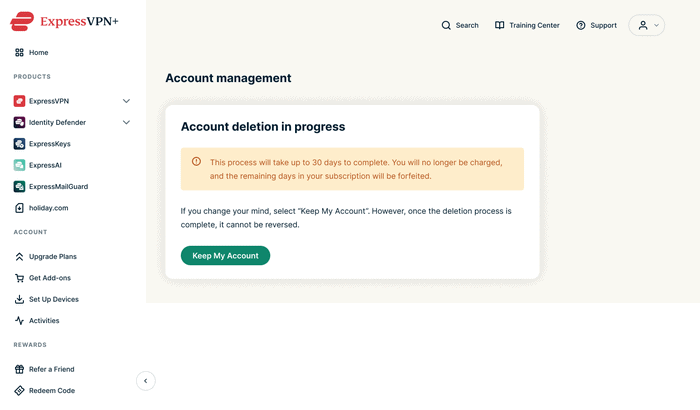
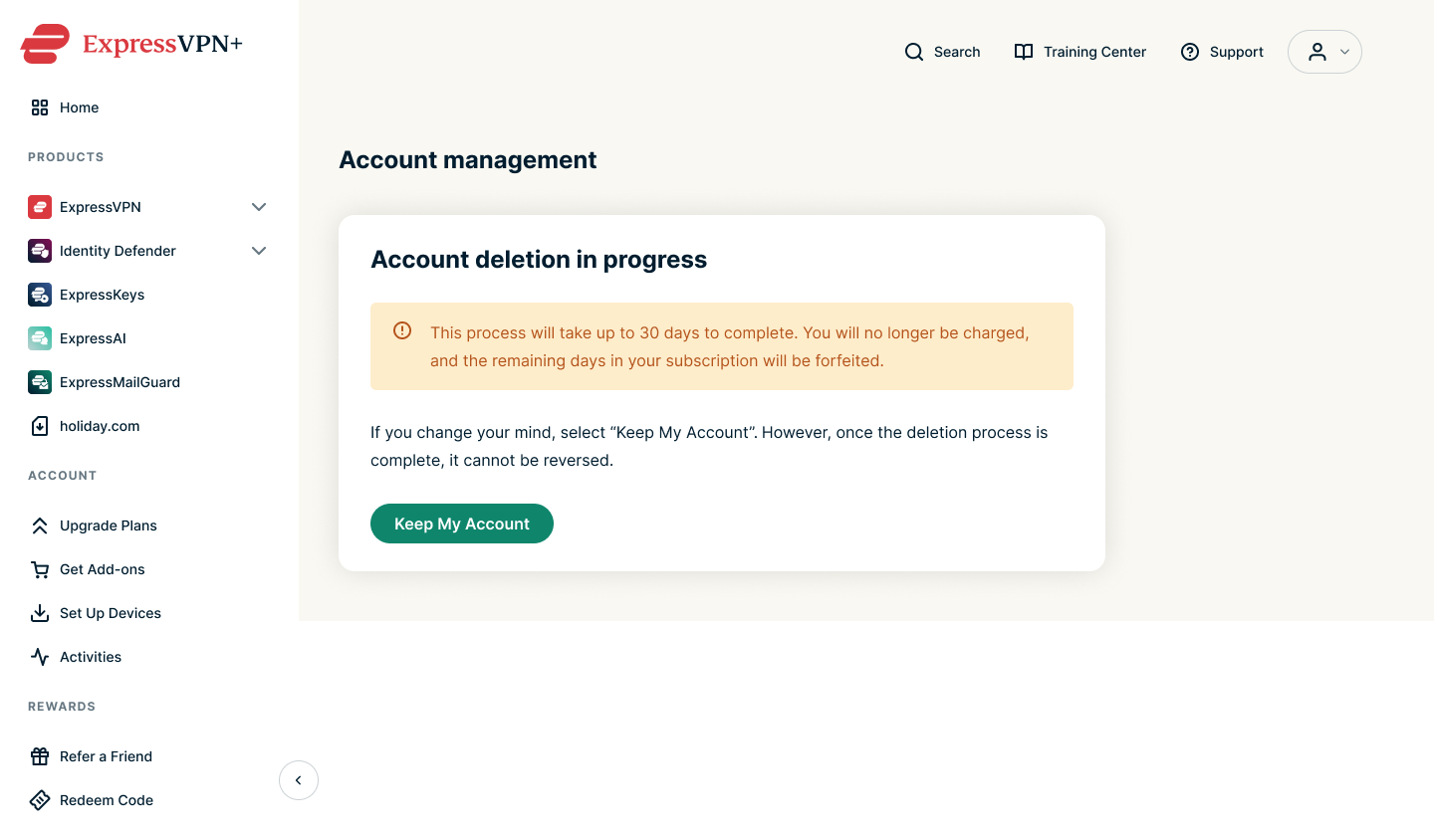
    • หมายเหตุ : ถ้าคุณขอลบบัญชีโดยไม่ได้ตั้งใจ ให้แตะที่เก็บบัญชีของฉันไว้

เมื่อบัญชีถูกลบแล้ว ข้อมูลส่วนตัวของคุณจะถูกลบอย่างถาวรและคุณจะไม่สามารถเข้าถึงบริการของเราได้

ต้องการความช่วยเหลือ? ติดต่อทีมสนับสนุน ExpressVPN เพื่อขอความช่วยเหลือทันที

กลับไปด้านบน

คำแนะนำสำหรับเดสก์ท็อป

ทำตามขั้นตอนต่อไปนี้ถ้าคุณใช้อุปกรณ์เดสก์ท็อป อย่างเช่น Windows PC หรือ Mac

คุณสามารถขอลบบัญชีได้บนเว็บไซต์ ExpressVPN ในการจะทำเช่นนั้น:

  1. ไปที่เว็บไซต์ ExpressVPN (www.expressvpn.com) และเลือกบัญชีของฉัน
  2. กรอกรหัสผ่านบัญชี ExpressVPN ของคุณและเลือกลงชื่อเข้าใช้

  3. จากเมนูทางด้านซ้ายมือ เลือกบัญชีและการเรียกเก็บเงิน
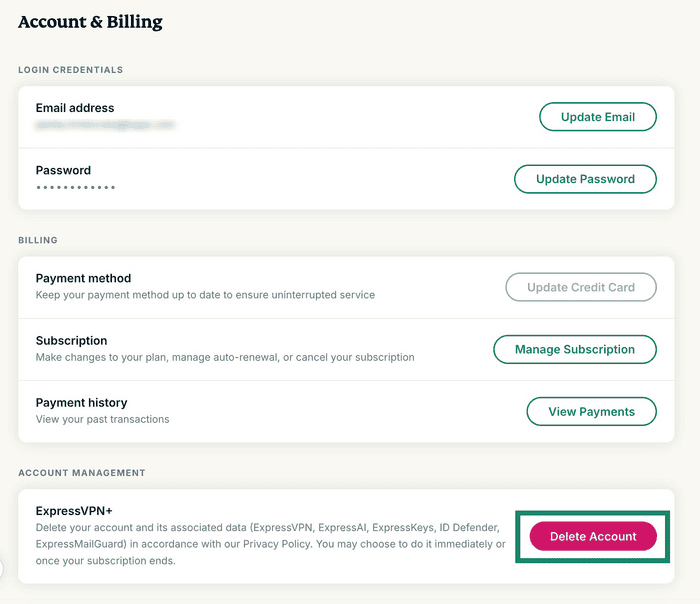
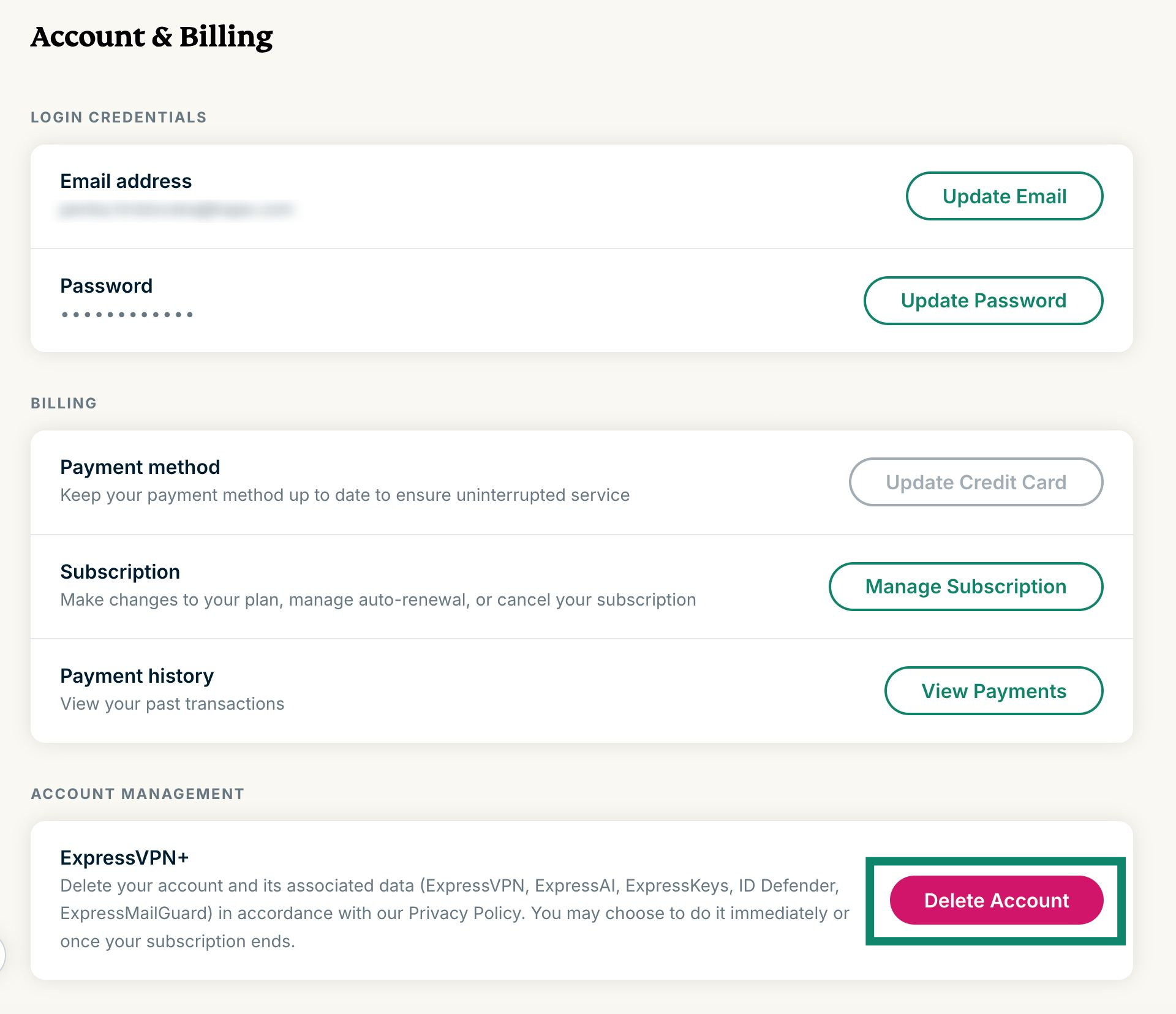
  4. เลื่อนลงไปที่การจัดการบัญชีและเลือกลบบัญชี

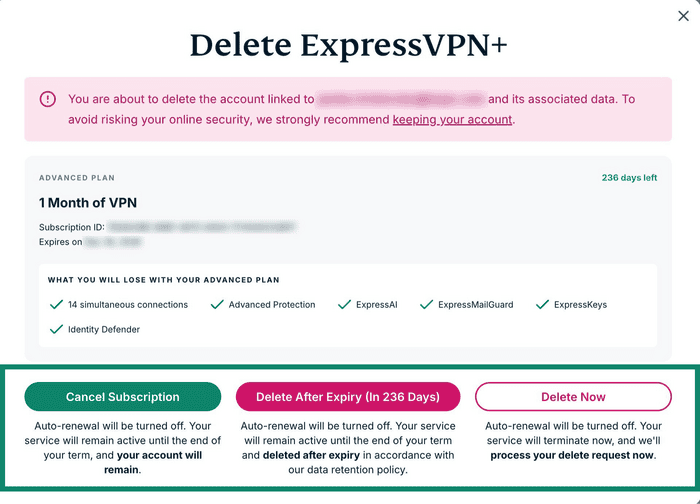
  5. ตรงนี้คุณจะมีสามตัวเลือก รายละเอียดตามด้านล่าง แตะเลือกลบหลังจากหมดอายุ (ใน xxx วัน) หรือลบตอนนี้เพื่อดำเนินการขั้นตอนลบบัญชีต่อ:
    • ยกเลิกการสมัครสมาชิก: การต่ออายุอัตโนมัติจะถูกปิด แต่บัญชีของคุณจะยังไม่ถูกลบ
    • ลบหลังจากหมดอายุ (ใน xxx วัน): การต่ออายุอัตโนมัติจะถูกปิด และบัญชีของคุณจะถูกลบหลังจากที่การสมัครสมาชิกของคุณหมดอายุ
    • ลบตอนนี้: การต่ออายุอัตโนมัติจะถูกปิด และบัญชีของคุณจะถูกลบในทันที
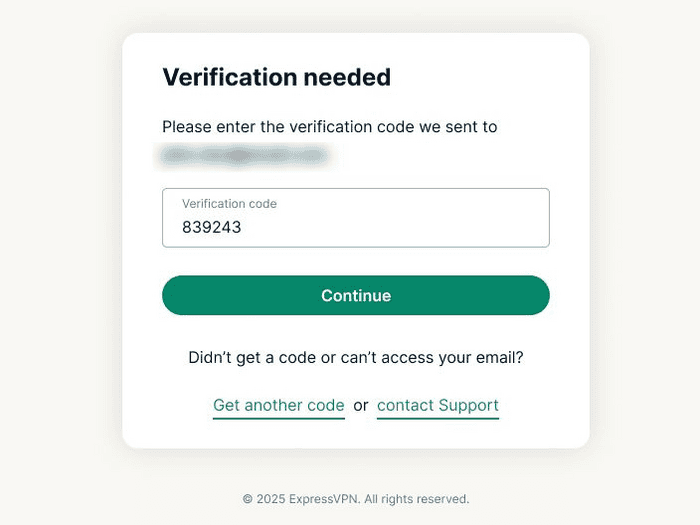
  6. คุณจะถูกขอให้ตรวจสอบคำร้องขอลบบัญชี ExpressVPN รหัสยืนยันจะถูกส่งไปยังที่อยู่อีเมลของคุณ กรอกรหัสในช่องที่ระบุไว้สำหรับรหัสยืนยัน จากนั้นเลือกดำเนินการต่อ
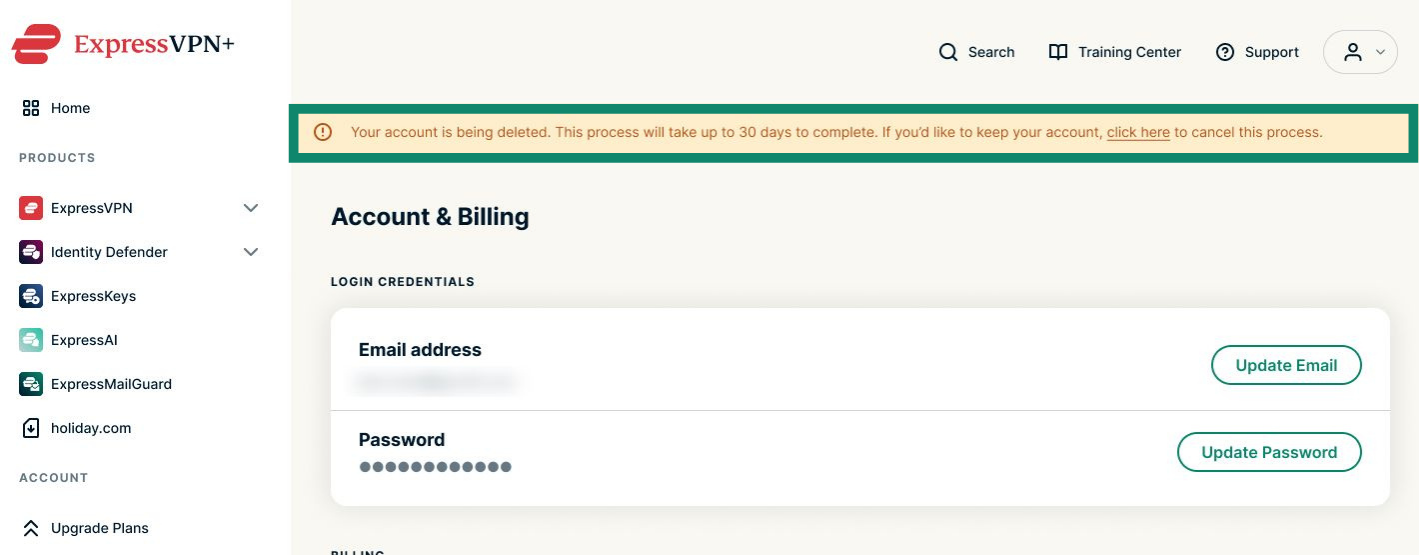
  7. คุณจะเห็นข้อความยืนยัน และคุณก็จะได้รับอีเมลยืนยันคำร้องขอลบบัญชีของคุณ
    • หมายเหตุ : ถ้าคุณขอลบบัญชีโดยไม่ได้ตั้งใจ ให้เลือกเก็บบัญชีของฉันไว้

เมื่อบัญชีถูกลบแล้ว ข้อมูลส่วนตัวของคุณจะถูกลบอย่างถาวรและคุณจะไม่สามารถเข้าถึงบริการของเราได้

ต้องการความช่วยเหลือ? ติดต่อทีมสนับสนุน ExpressVPN เพื่อขอความช่วยเหลือทันที

กลับไปด้านบน

Share in FacebookShare in TwitterShare in WhatsappShare in TelegramShare by email
บทความนี้มีประโยชน์หรือไม่?

เราเสียใจที่ได้ยินเรื่องนี้ โปรดบอกให้เราทราบว่าควรปรับปรุงอย่างไร

Please enter a valid email address.

เจ้าหน้าที่ฝ่ายสนับสนุนของเราจะติดต่อกลับเพื่อช่วยแก้ปัญหาของคุณ

Share in FacebookShare in TwitterShare in WhatsappShare in TelegramShare by email
  • VPN สำหรับทุกอุปกรณ์
  • ดาวน์โหลด ExpressVPN
  • MacOS
  • Windows PC
  • iOS (iPhone และ iPad)
  • Android
  • Linux
  • เราเตอร์
  • Apple TV
  • Fire Stick
  • ทีวี Android
  • ส่วนขยาย Chrome
  • ที่ตั้งเซิร์ฟเวอร์ VPN
  • เซิร์ฟเวอร์ใน 105 ประเทศ
  • VPN สหรัฐอเมริกา
  • VPN สหราชอาณาจักร
  • VPN แคนาดา
  • VPN ออสเตรเลีย
  • คุณสมบัติ
  • สำรวจคุณสมบัติทั้งหมด
  • การทดลองใช้ VPN ที่ปราศจากความเสี่ยง
  • แผนและราคา
  • ผลิตภัณฑ์
  • ตัวจัดการรหัสผ่าน Keys
  • เราเตอร์ Aircove
  • เกี่ยวกับ ExpressVPN
  • เกี่ยวกับเรา
  • ศูนย์ความเชื่อถือ
  • ศูนย์สิทธิสิทธิประโยชน์
  • การตรวจสอบความปลอดภัย
  • รีวิว ExpressVPN
  • ผู้เชี่ยวชาญของเรา
  • สื่อ
  • ร่วมงานกับเรา
  • โปรแกรม
  • ท็อตแน่ม ฮ็อทสเปอร์
  • มาเป็นพันธมิตรกับเรา
  • โปรแกรมพันธมิตร
  • อินฟลูเอนเซอร์
  • รับความช่วยเหลือ
  • ศูนย์สนับสนุน
  • สาธิตการตั้งค่า VPN
  • คำถามที่พบบ่อย
  • ติดต่อเรา
  • ซื้อ VPN
  • กรอกรหัสแลกรางวัล
  • เรียนรู้เพิ่มเติม
  • VPN คืออะไร?
  • IP ของฉันคืออะไร?
  • ซ่อน IP ของฉัน
  • 5 สุดยอดการใช้งาน VPN
  • บล็อก

© 2026 ExpressVPN. All rights reserved.

นโยบายความเป็นส่วนตัว เงื่อนไขการให้บริการ Cookie Preferences
Youtube Linkedin Twitter Facebook Instagram

เลือกภาษา

  • English
  • Dansk
  • Deutsch
  • Español
  • Français
  • Italiano
  • Nederlands
  • Norsk
  • Polski
  • Português
  • Suomi
  • Svenska
  • Türkçe
  • Русский
  • 한국어
  • 日本語

Live chat

Need help? Chat with us!

Online