




Sie möchten ein VPN / DNS für Ihr Gerät?
Jetzt ExpressVPN nutzenEin ExpressVPN-Konto. Alle Geräte.
Apps kostenlos nutzenIn der nachfolgenden Anleitung erfahren Sie, wie Sie Ihr ExpressVPN-Konto löschen können. Möchten Sie ExpressVPN nicht mehr nutzen, aber Ihr Konto aber behalten, erfahren Sie hier, wie Sie Ihr Abonnement kündigen können.
Hinweis: Das Löschen Ihres Kontos ist endgültig und lässt sich nicht rückgängig machen. Sobald die Anfrage bearbeitet wurde, können Sie sich nicht mehr anmelden und das Konto auch nicht wiederherstellen. Nach dem Löschen verlieren Sie den Zugriff auf alle damit verbundenen Services und Kontodaten. Ist Ihr Abonnement zum Zeitpunkt der Löschung aktiv, werden durch das Löschen des Kontos auch künftige Verlängerungen gestoppt. Bevor Sie fortfahren, vergewissern Sie sich bitte, dass Sie keinen Zugriff mehr auf den Service benötigen.
Es gibt zwei Optionen, Ihr ExpressVPN-Konto zu löschen:
Option 1: Via ExpressVPN+ Portal löschen
Anleitung für den Desktop
Folgen Sie den Anweisungen, wenn Sie ein Desktop-Gerät wie einen Windows-PC oder einen Mac verwenden.
Sie können auf der ExpressVPN-Website die Löschung Ihres Kontos beantragen. Dazu gehen Sie wie folgt vor:
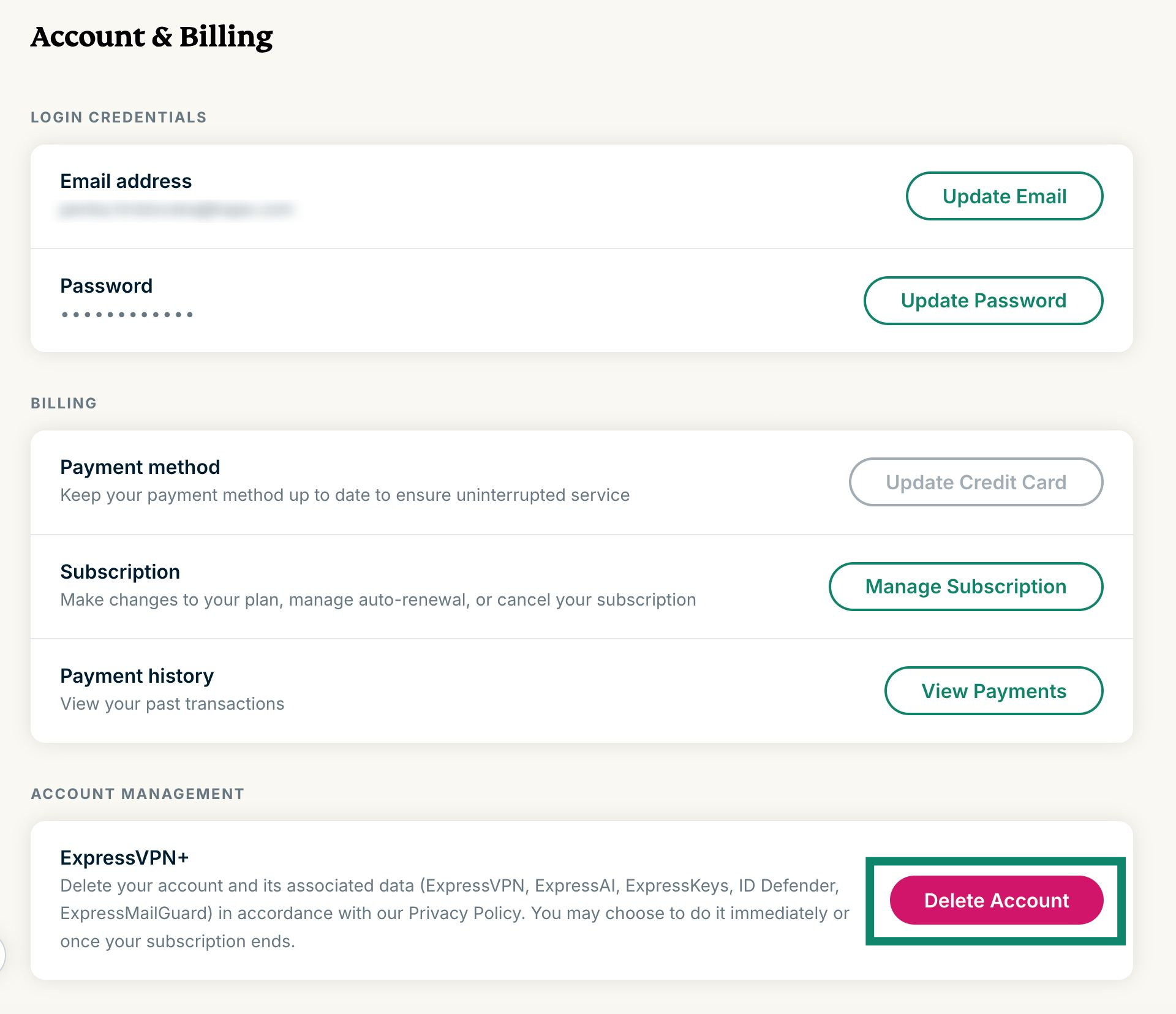
- Öffnen Sie im ExpressVPN+ Portal die Seite Konto & Abrechnung .
- Melden Sie sich an Ihrem ExpressVPN-Konto an, sobald Sie dazu aufgefordert werden.
- Scrollen Sie nach unten zum Account management (Kontomanagement) und wählen Sie Delete account (Konto löschen).
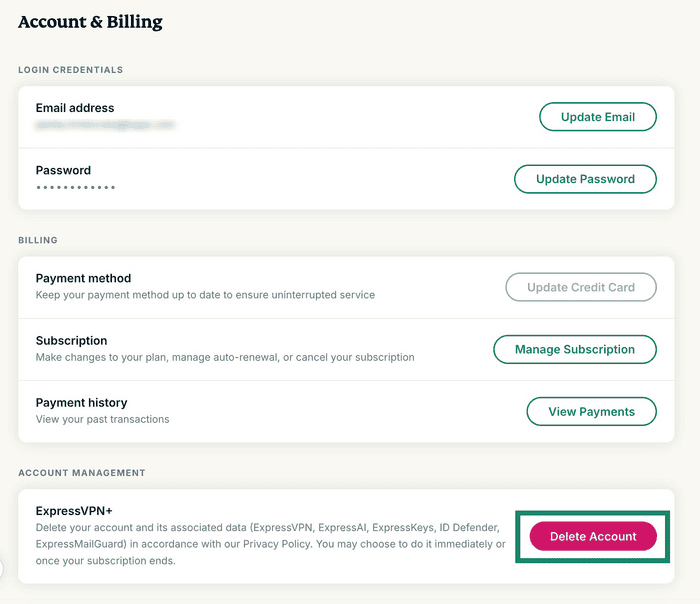

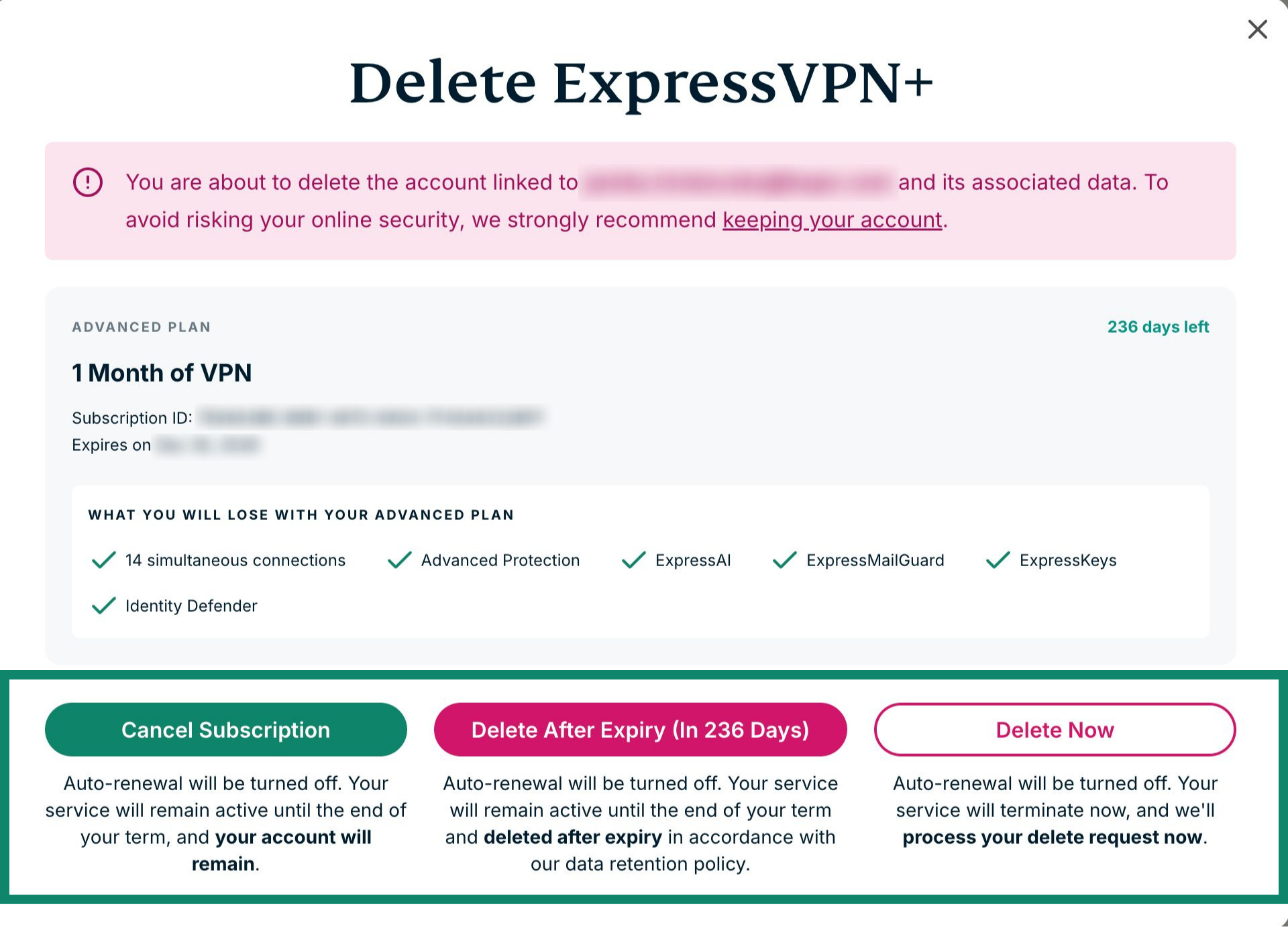
- Hier haben Sie drei Optionen:
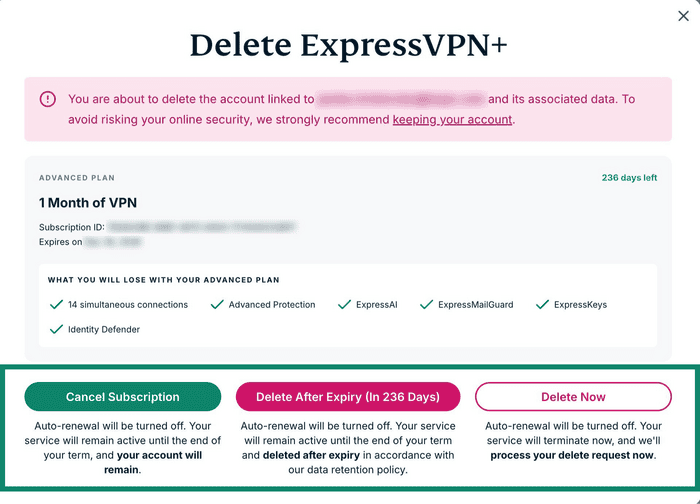

- Cancel Subscription (Abonnement kündigen): Automatische Verlängerung wird deaktiviert, aber Ihr Konto wird nicht gelöscht.
- Delete After Expiry (In xxx Days) (Nach dem Ablauf löschen (In xxx Tagen)): Die automatische Verlängerung wird deaktiviert. Ihr Konto wird nach Ablauf Ihres Abonnements gelöscht.
- Delete Now (Jetzt löschen): Die automatische Verlängerung wird deaktiviert und Ihre Anfrage wird sofort bearbeitet. Entscheiden Sie sich für diese Option, verfällt die verbleibende Laufzeit Ihres Abonnements.
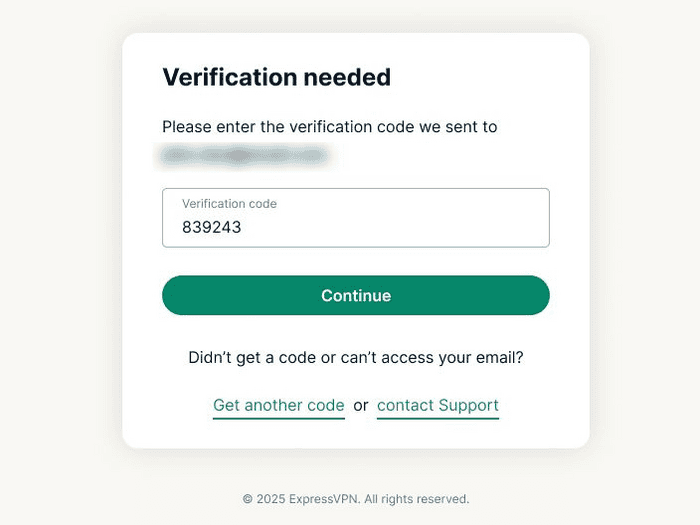
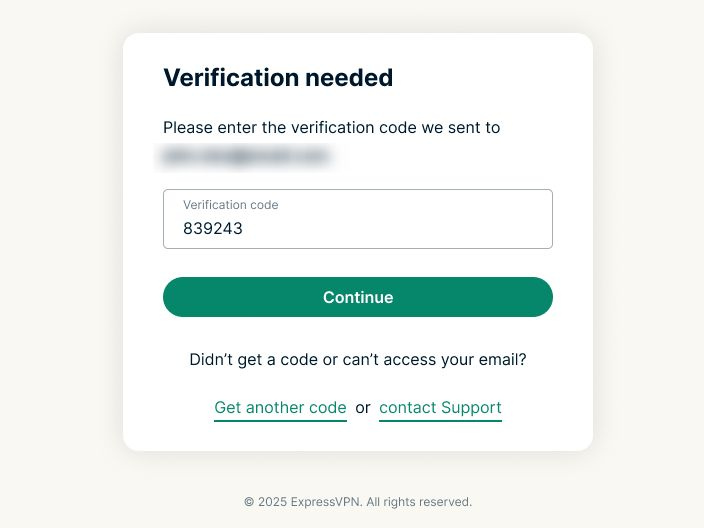
- Anschließend werden Sie aufgefordert, den Antrag zur Löschung Ihres ExpressVPN-Kontos zu bestätigen. Es wird ein Bestätigungs-Code an Ihre E-Mail-Adresse geschickt. Geben Sie den Code in das Feld Verification Code (Bestätigungs-Code) ein. Wählen Sie anschließend Continue (Weiter).

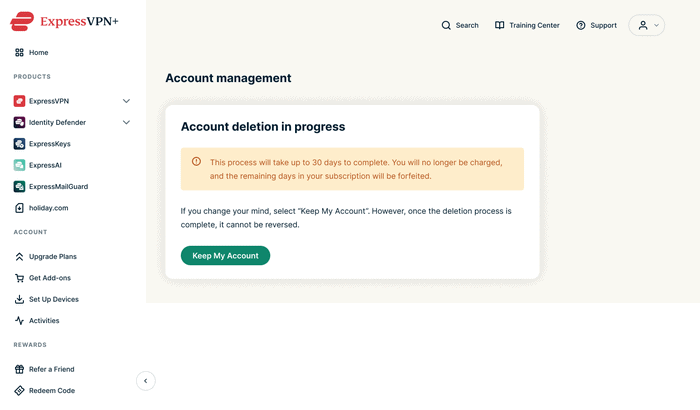
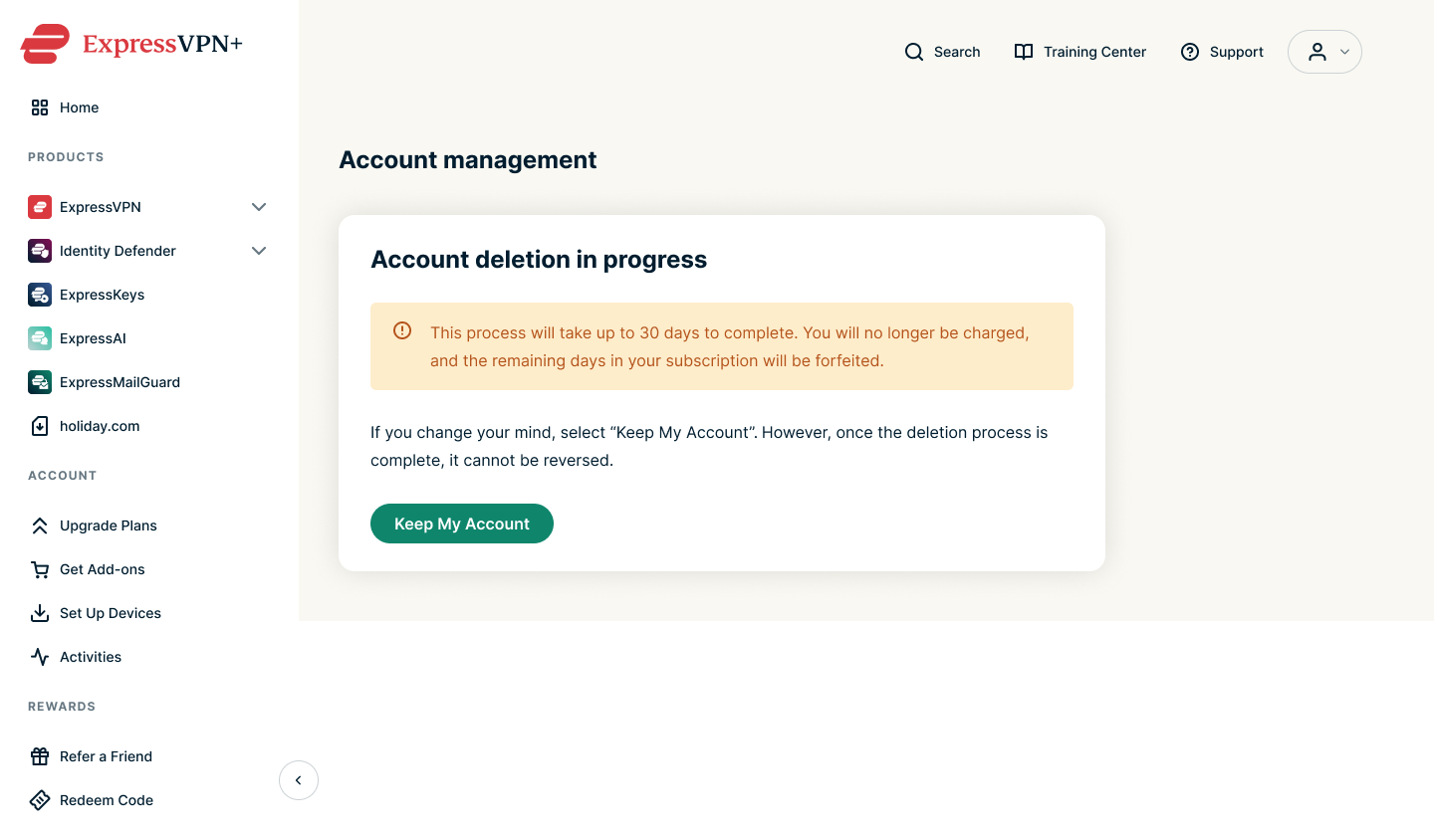
- Nun wird eine Bestätigungsmeldung angezeigt. Sie erhalten zudem eine E-Mail zur Bestätigung Ihrer Anfrage zur Löschung Ihres Kontos.

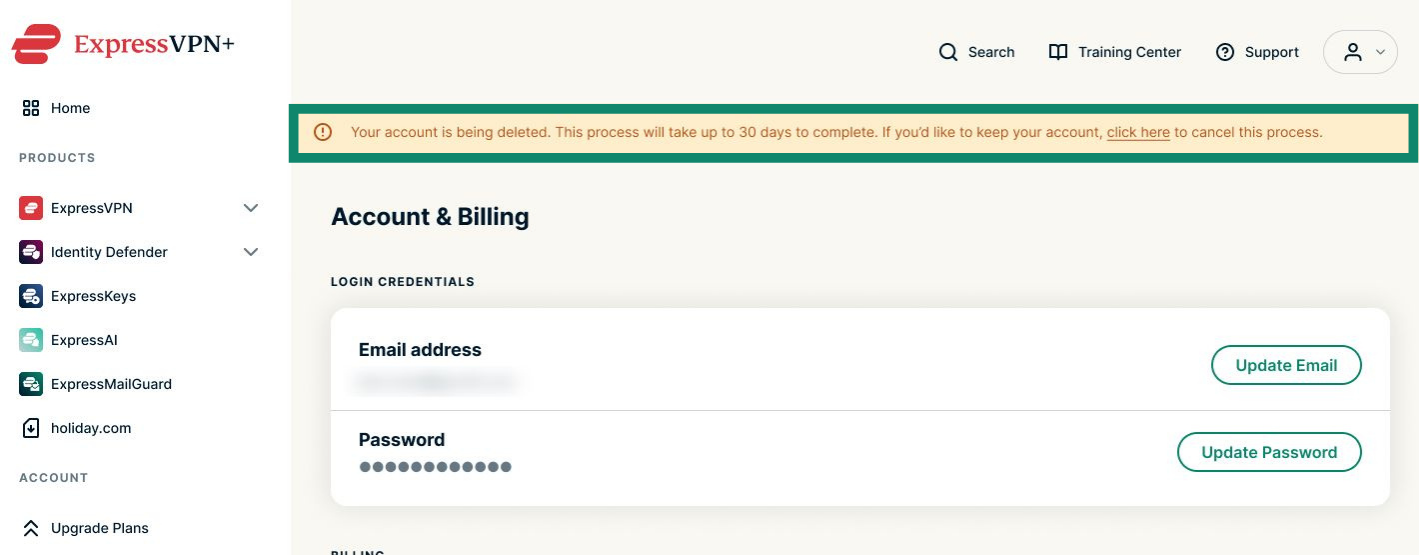
Hilfe benötigt? Kontaktieren Sie das Support-Team von ExpressVPN, um sofort Hilfe zu erhalten.
Anleitung für Mobilgeräte (Geräte mit Android oder iOS)
Folgen Sie den Anweisungen, wenn Sie ein Mobilgerät ein iPhone, iPad oder Android-Smartphone verwenden.
Sie können auf der ExpressVPN-Website die Löschung Ihres Kontos beantragen. Dazu gehen Sie wie folgt vor:
- Öffnen Sie im ExpressVPN+ Portal die Seite Konto & Abrechnung.
- Melden Sie sich an Ihrem ExpressVPN-Konto an, sobald Sie dazu aufgefordert werden.
- Scrollen Sie nach unten zum Account management (Kontomanagement) und wählen Sie Delete account (Konto löschen).
- Hier haben Sie drei Optionen, die nachfolgend erklärt werden.
- Cancel Subscription (Abonnement kündigen): Automatische Verlängerung wird deaktiviert, aber Ihr Konto wird nicht gelöscht.
- Delete After Expiry (In xxx Days) (Nach dem Ablauf löschen (In xxx Tagen)): Die automatische Verlängerung wird deaktiviert. Ihr Konto wird nach Ablauf Ihres Abonnements gelöscht.
- Delete Now (Jetzt löschen): Die automatische Verlängerung wird deaktiviert und Ihr Konto wird sofort gelöscht.
- Anschließend werden Sie aufgefordert, den Antrag zur Löschung Ihres ExpressVPN-Kontos zu bestätigen. Es wird ein Bestätigungs-Code an Ihre E-Mail-Adresse geschickt. Geben Sie den Code in das Feld Verification Code (Bestätigungs-Code) ein und wählen Sie anschließend Continue (Weiter).
- Nun wird eine Bestätigungsmeldung angezeigt. Sie erhalten zudem eine E-Mail zur Bestätigung Ihrer Anfrage zur Löschung Ihres Kontos.
Hinweis: Haben Sie das Löschen Ihres Kontos aus Versehen beantragt, tippen Sie auf Keep My Account (Mein Konto behalten).
Hilfe benötigt? Kontaktieren Sie das Support-Team von ExpressVPN, um sofort Hilfe zu erhalten.
Option 2: Via iOS-App von ExpressVPN löschen
Benutzen Sie ExpressVPN auf iOS (iPhone oder iPad), können Sie Ihr Konto manuell in der App löschen:
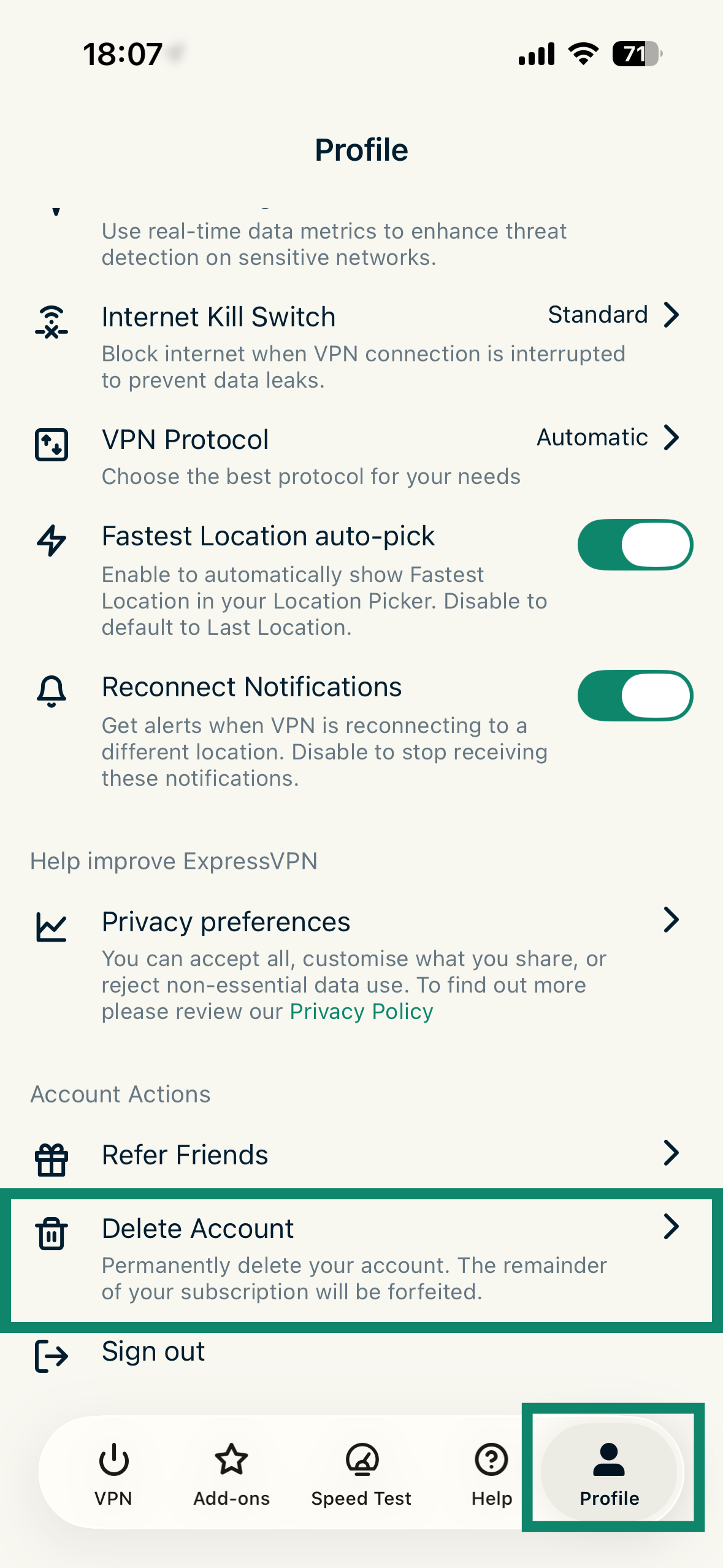
- Tippen Sie in der iOS-App von ExpressVPN auf Profile (Profil) und anschließend auf Delete Account (Konto löschen).
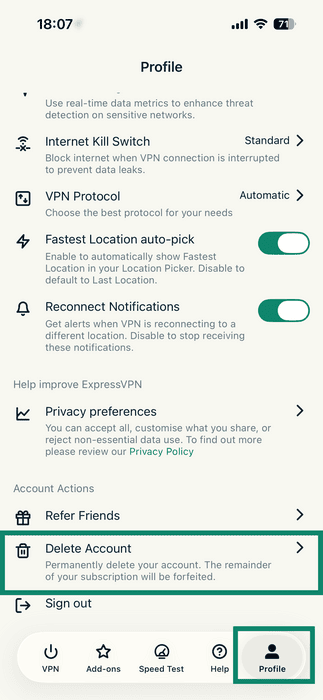

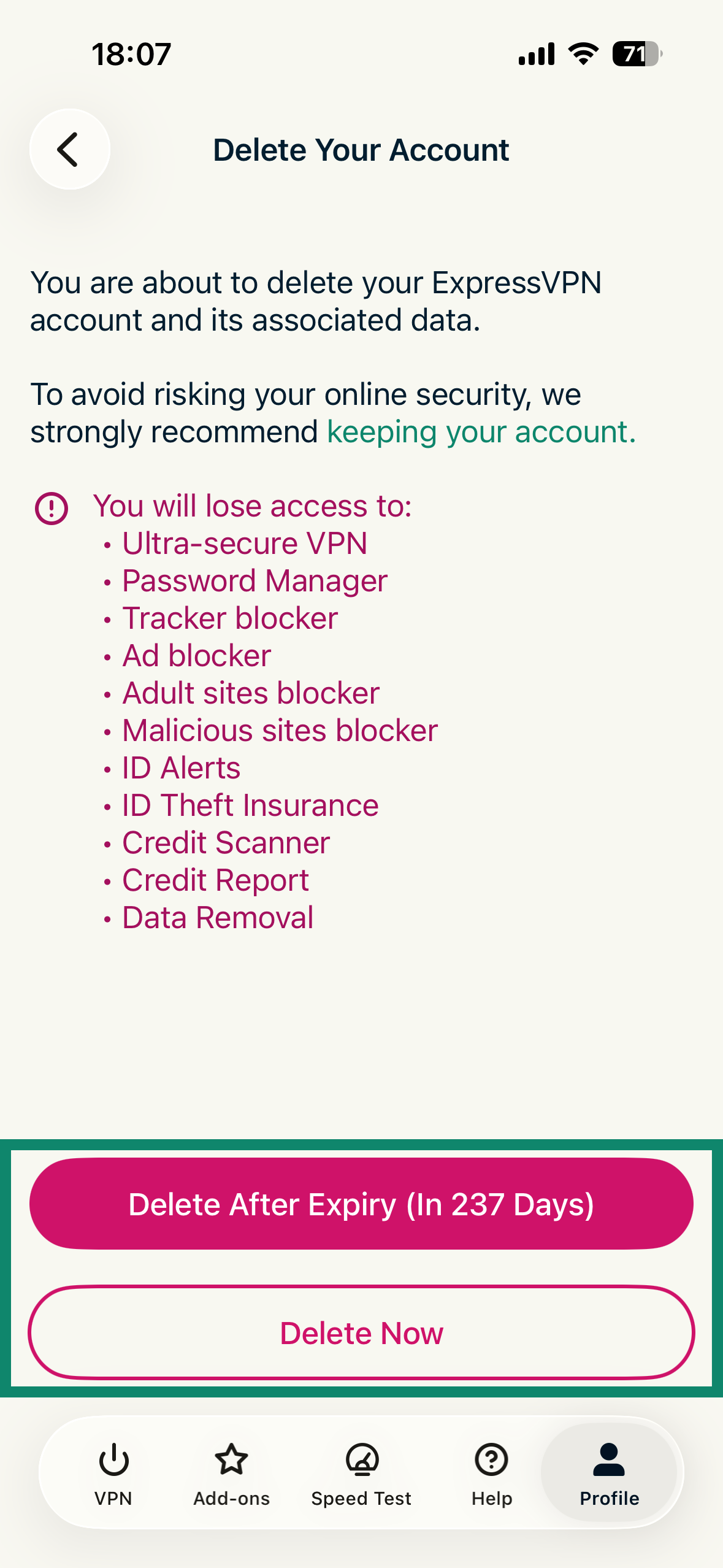
- Hier haben Sie zwei Optionen, wie unten im Detail erklärt. Tippen Sie auf die gewünschte Option:
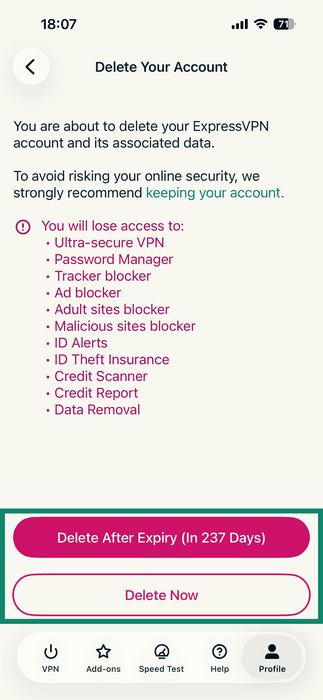
- Delete After Expiry (In xxx Days) (Nach dem Ablauf löschen (In xxx Tagen)): Die automatische Verlängerung wird deaktiviert. Ihr Konto wird nach Ablauf Ihres Abonnements gelöscht.
- Delete Now (Jetzt löschen): Die automatische Verlängerung wird deaktiviert und Ihr Konto wird sofort gelöscht.
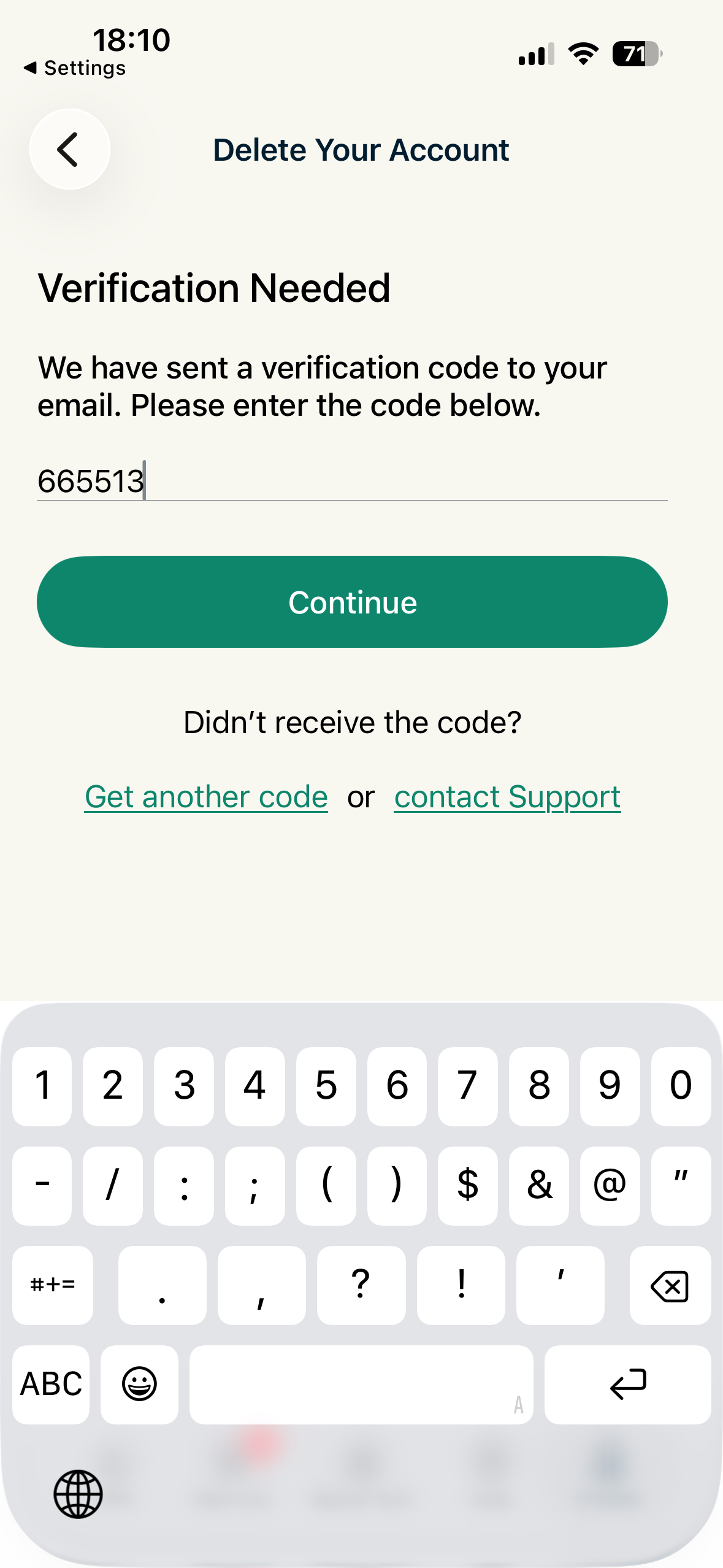
- Anschließend werden Sie aufgefordert, den Antrag zur Löschung Ihres ExpressVPN-Kontos zu bestätigen. Es wird ein Bestätigungs-Code an Ihre E-Mail-Adresse geschickt. Geben Sie den Code in das Feld „Verification Code (Bestätigungs-Code)“ ein. Wählen Sie anschließend Continue (Weiter).
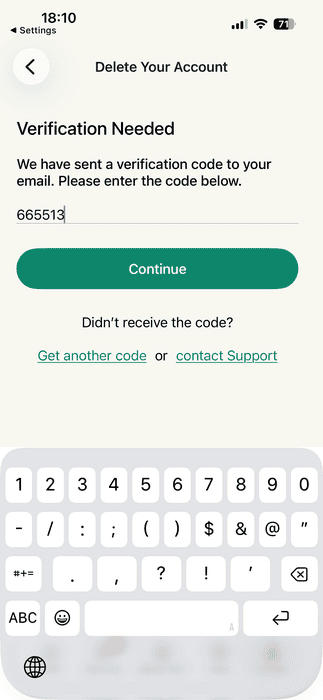
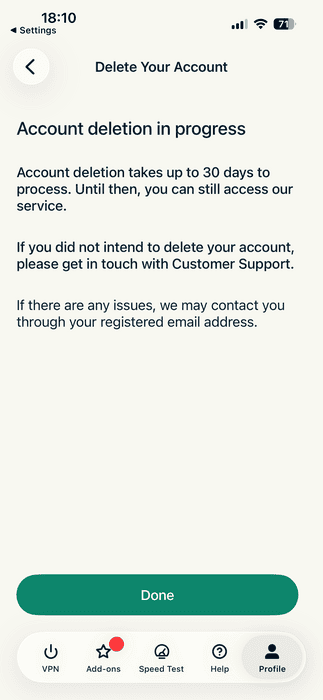
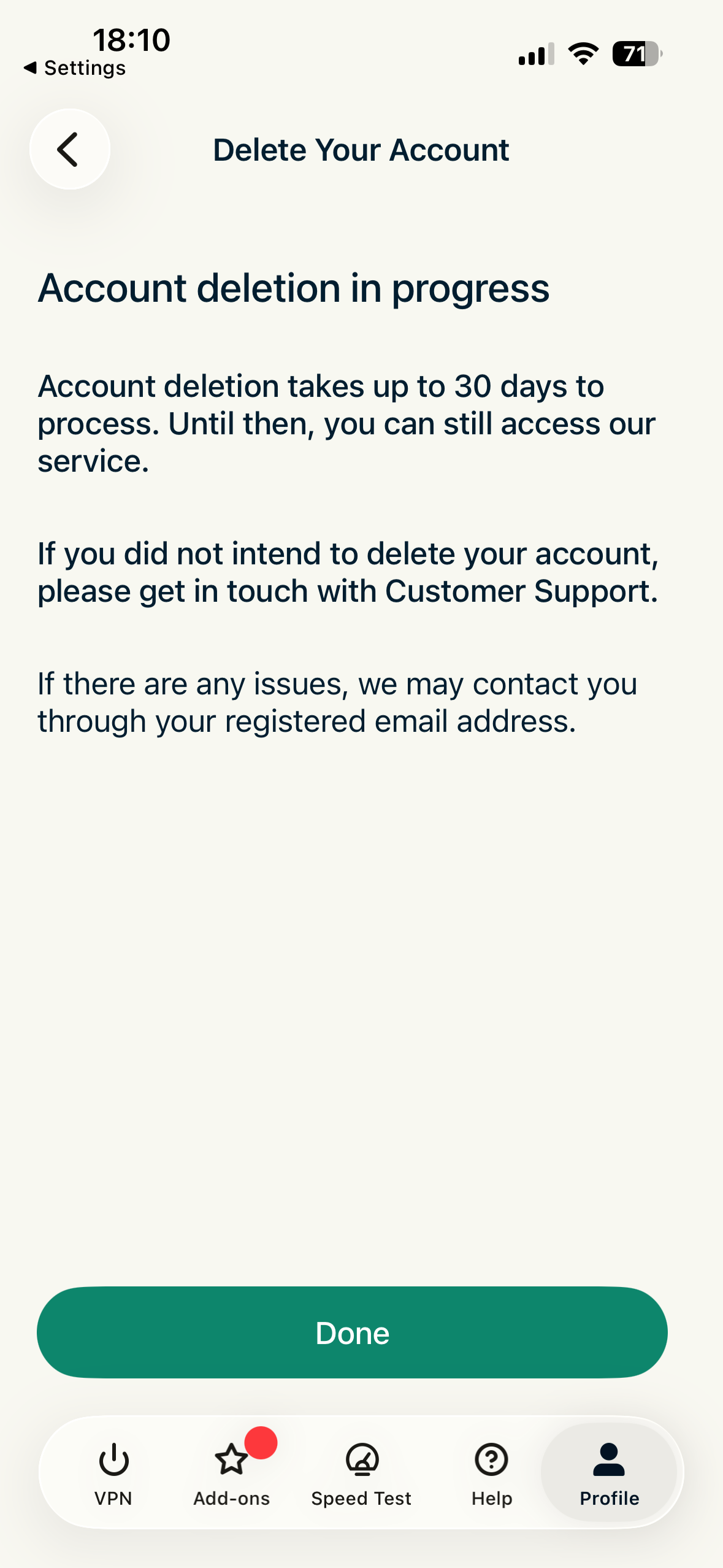
- Tippen Sie im nächsten Bildschirm auf Done (Fertig).
Hilfe benötigt? Kontaktieren Sie das Support-Team von ExpressVPN, um sofort Hilfe zu erhalten.