• No-Logs Policy
    • Servers in 105 Countries
    • Use on Multiple Devices
    • High-Speed VPN
    • Access Online Services Securely
    • VPN for Gaming
    • 30-Day Money-Back Guarantee
    • Explore All Features
    • About ExpressVPN
    Sign Up For ExpressVPN

    One subscription gives you access to a fast-growing suite of privacy and security tools that work seamlessly together to improve your digital life.

    View all products
    • Lightway VPN Protocol
    • Internet Kill Switch
    • Split Tunneling
    • Private, Encrypted DNS
    • Avoid ISP Throttling
    • Threat Manager
    • Ad Blocker
    • Parental Controls
    • Dedicated IP
    • Windows
    • MacOS
    • Linux
    • iPhone / iPad
    • Android
    • Apple TV
    • Fire Stick
    • Android TV
    • VPN for Routers
    • Aircove Routers
    • Chrome
    • Firefox
    • Edge
    • All Apps & Devices
  • Pricing
    • What Is a VPN?
    • VPN for Beginners
    • How To Use a VPN
    • VPN Encryption Explained
    • Blog
    • Glossary
    • IP Address Checker
    • DNS Leak Test
    • WebRTC Leak Test
    • Password Generator
    • Support Center
    • FAQ
    • Live Chat
    • VPN Setup Tutorials
    • Redemption Code
  • VPN for Teams
    • ExpressVPN

      ExpressVPN Industry-leading, ultra-fast VPN with secure servers in 105 countries.

    • ExpressMailGuard

      ExpressMailGuard Private email relay service to protect your inbox and identity.

    • ExpressKeys

      ExpressKeys Secure password management, multi-factor authentication, and more.

    • ExpressAI

      ExpressAI The first consumer AI powered by confidential computing for privacy-led intelligence.

    • Identity Defender

      Identity Defender Powerful suite of ID protection, monitoring, and data removal tools.

    • View All Products

    Other products from the family behind ExpressVPN

    • holiday.com eSIM

      holiday.com eSIM Unlimited data with a single eSIM across 150+ destinations.

    • Intego

      Intego Award-winning macOS antivirus, firewall, system tools, and more.

    ExpressVPN for Teams
    ExpressVPN for Teams

    Get fast, secure VPN protection for growing teams. Easy to deploy, simple to manage, built to scale.

  • My Account
  • Aircove Edinin Hemen Yükle
  • Kullanmaya Başla
  • Kullanmaya Başla Aircove Edinin Hemen Yükle
  • Explore ExpressVPN
    • Why ExpressVPN?
    • No-Logs Policy
    • Servers in 105 Countries
    • Use on Multiple Devices
    • High-Speed VPN
    • Access Online Services Securely
    • VPN for Gaming
    • 30-Day Money-Back Guarantee
    • Explore All Features
    • About ExpressVPN
    • VPN Security & Access Features
    • Lightway VPN Protocol
    • Internet Kill Switch
    • Split Tunneling
    • Private, Encrypted DNS
    • Avoid ISP Throttling
    • Threat Manager
    • Ad Blocker
    • Parental Controls
    • Dedicated IP
  • Download VPN
    • Desktop
    • Windows
    • MacOS
    • Linux
    • Mobile
    • iPhone / iPad
    • Android
    • TV & Streaming
    • Apple TV
    • Fire Stick
    • Android TV
    • Routers
    • VPN for Routers
    • Aircove Routers
    • Extensions
    • Chrome
    • Firefox
    • Edge
    • All Apps & Devices
  • Pricing
  • Resources
    • VPN Basics
    • What Is a VPN?
    • VPN for Beginners
    • How To Use a VPN
    • VPN Encryption Explained
    • Content Library
    • Blog
    • Glossary
    • Tools
    • IP Address Checker
    • DNS Leak Test
    • WebRTC Leak Test
    • Password Generator
    • Support
    • Support Center
    • FAQ
    • Live Chat
    • VPN Setup Tutorials
    • Redemption Code
  • VPN for Teams
  • Products
    • ExpressVPN

      ExpressVPN Industry-leading, ultra-fast VPN with secure servers in 105 countries.

    • ExpressMailGuard

      ExpressMailGuard Private email relay service to protect your inbox and identity.

    • ExpressKeys

      ExpressKeys Secure password management, multi-factor authentication, and more.

    • ExpressAI

      ExpressAI The first consumer AI powered by confidential computing for privacy-led intelligence.

    • Identity Defender

      Identity Defender Powerful suite of ID protection, monitoring, and data removal tools.

    • View All Products

    Other products from the family behind ExpressVPN

    • holiday.com eSIM

      holiday.com eSIM Unlimited data with a single eSIM across 150+ destinations.

    • Intego

      Intego Award-winning macOS antivirus, firewall, system tools, and more.

    ExpressVPN for Teams
    ExpressVPN for Teams

    Get fast, secure VPN protection for growing teams. Easy to deploy, simple to manage, built to scale.

  • My Account
Home Home » ExpressVPN nasıl indirilir ve kurulur

Bilgi Merkezi

ExpressVPN nasıl indirilir ve kurulur

Son güncelleme: 30 Eylül 2025

Share in FacebookShare in TwitterShare in WhatsappShare in TelegramShare by email

Uygulamamızı ve özellikleri kullanabilmek için lütfen önce ExpressVPN hesabına giriş yapın.

Bu rehber, ExpressVPN uygulamasını cihazınıza nasıl indireceğinizi ve kuracağınızı gösterir. ExpressVPN’i indirmek ücretsizdir, ancak VPN işlevini kullanmak için bir ExpressVPN aboneliğiniz olması gerekir.

İndirme ve kurulum adımları farklı cihazlar için farklılık gösterir. Aşağıdaki cihazınıza karşılık gelen bölüme bakın.

Şuraya atla…

  • Windows, Mac veya Linux
  • Android
  • iOS
  • Yönlendirici

ExpressVPN’i Windows, Mac veya Linux’a indirin ve kurun

1. Hesabınıza giriş yapın

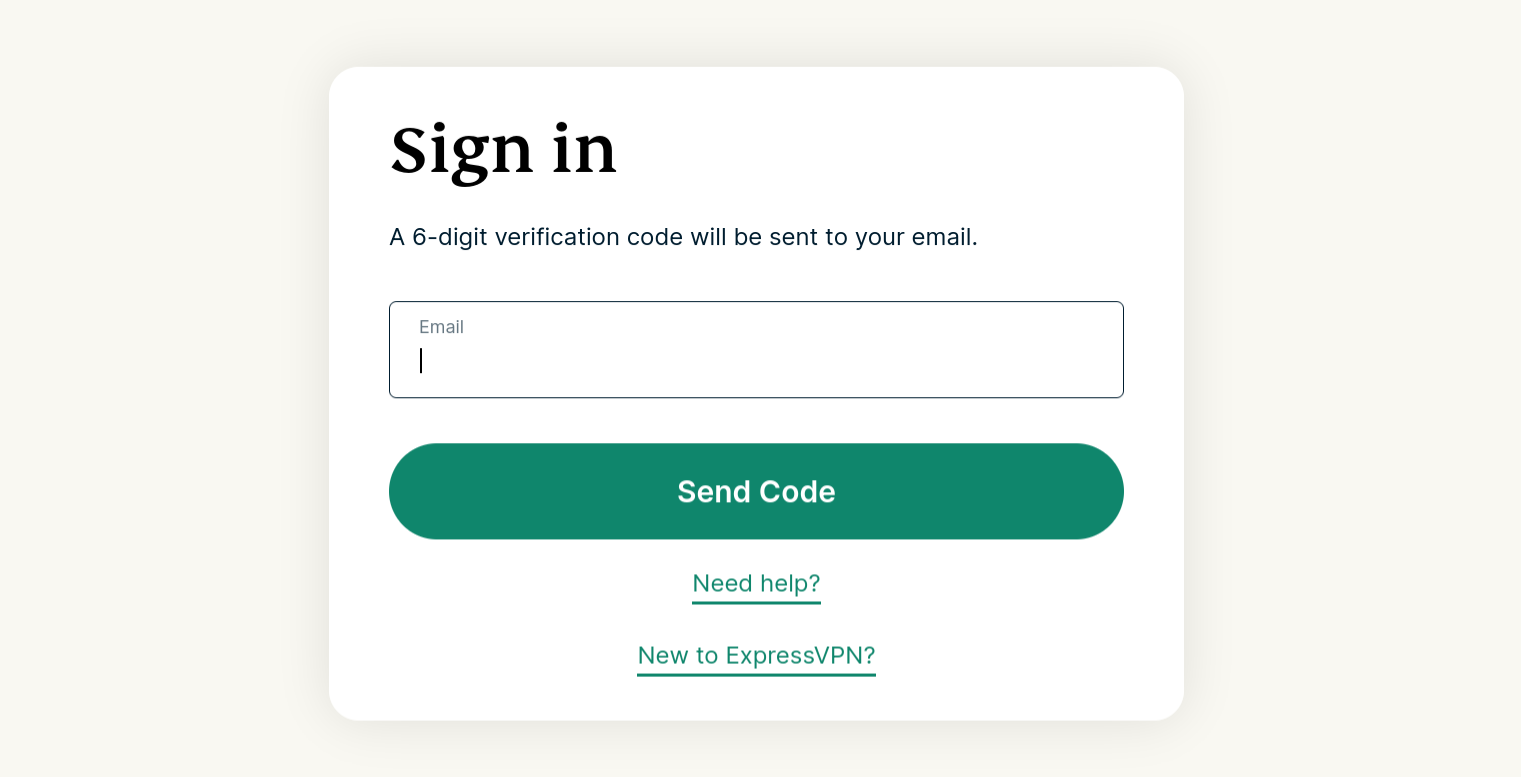
ExpressVPN hesabı kontrol paneli‘ne gidin. İstenirse ExpressVPN kimlik bilgilerinizi girin ve Giriş Yapın‘ı tıklayın.

Enter your account credentials, then click "Sign In."

E-postanıza gönderilen doğrulama kodunu girin.

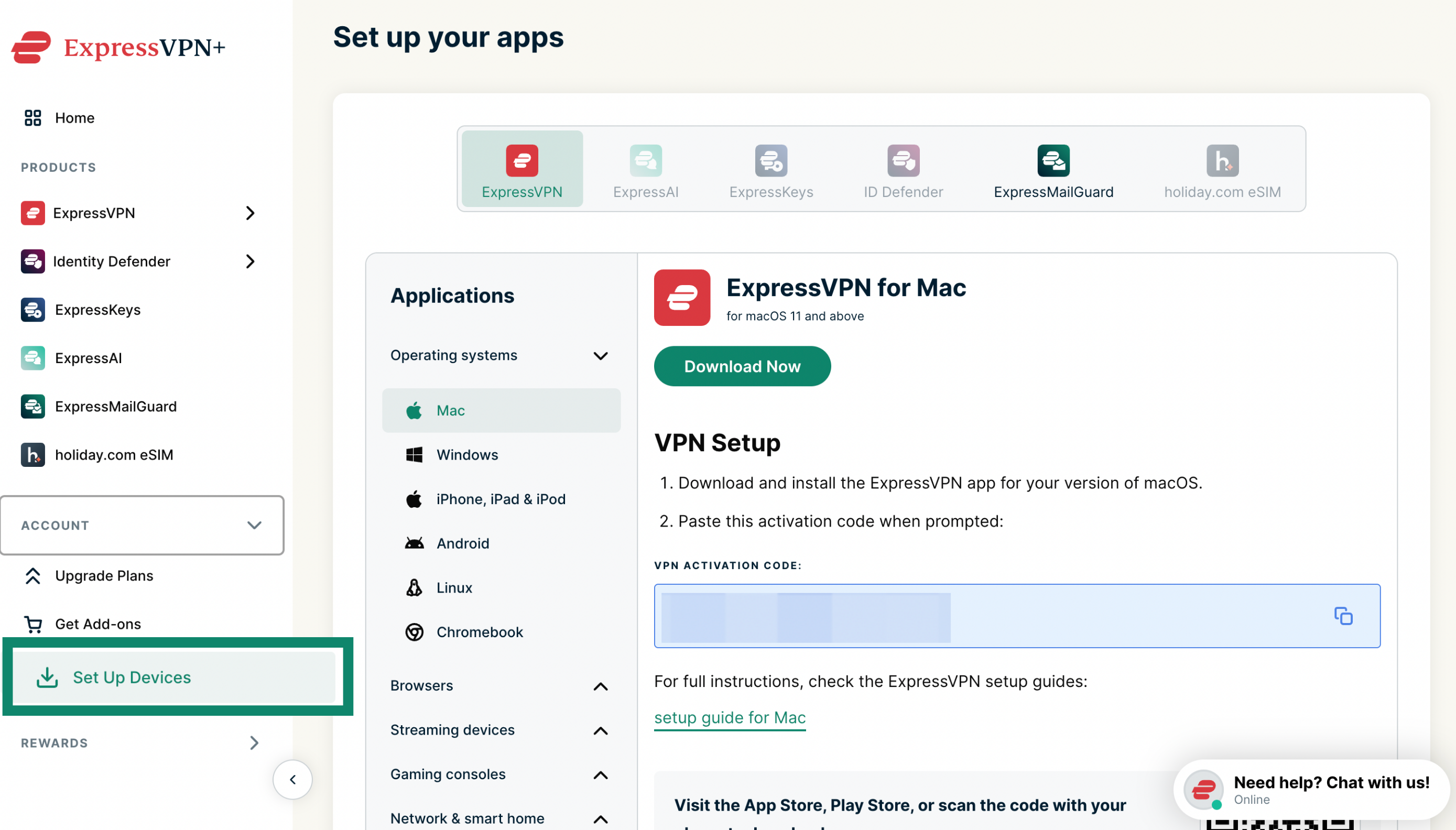
2. VPN uygulamasını indirin

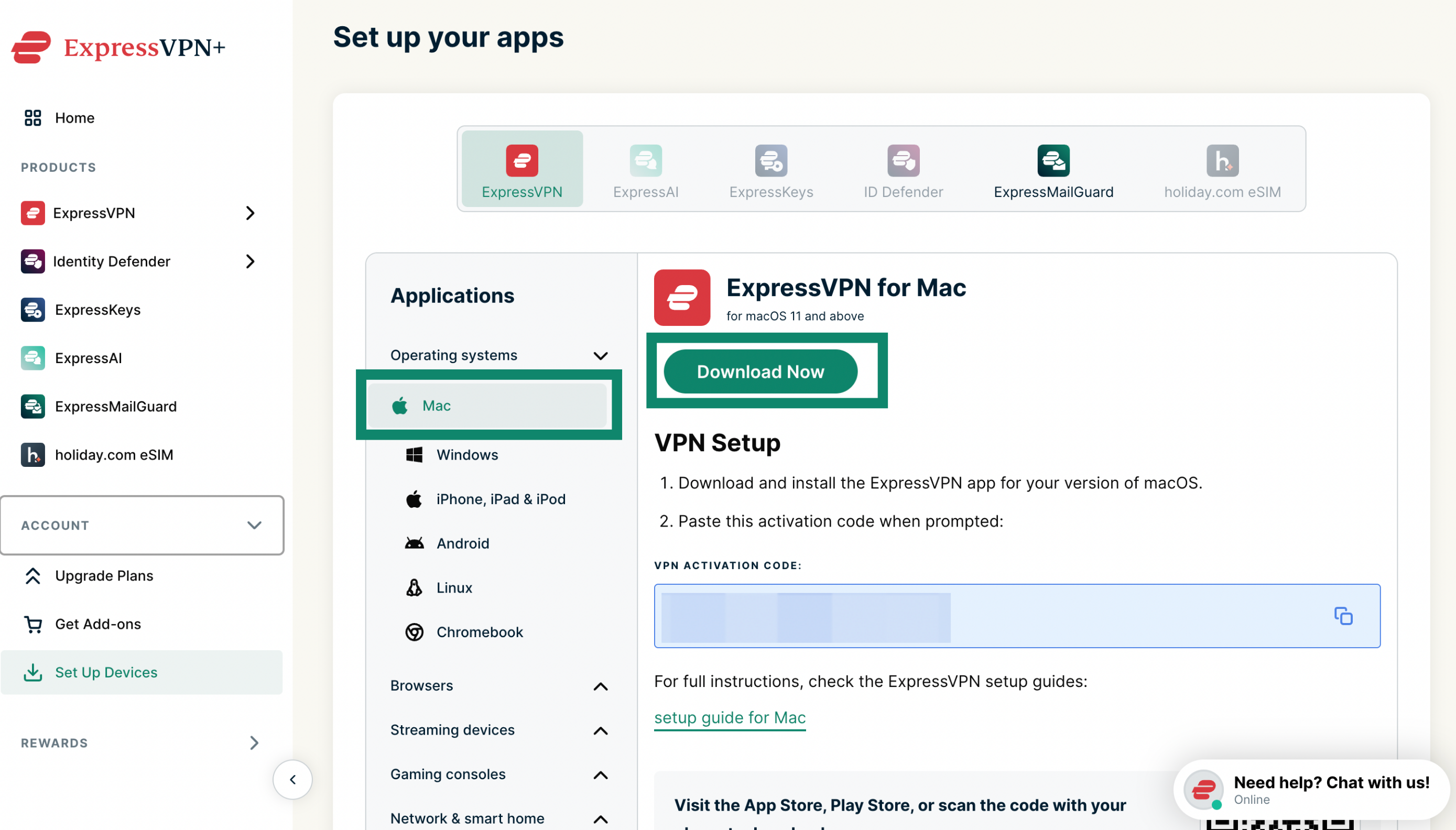
İşletim sisteminiz için ExpressVPN uygulamasını edinmek için İndir düğmesini tıklayın.

In your account dashboard, click "Download for Mac."

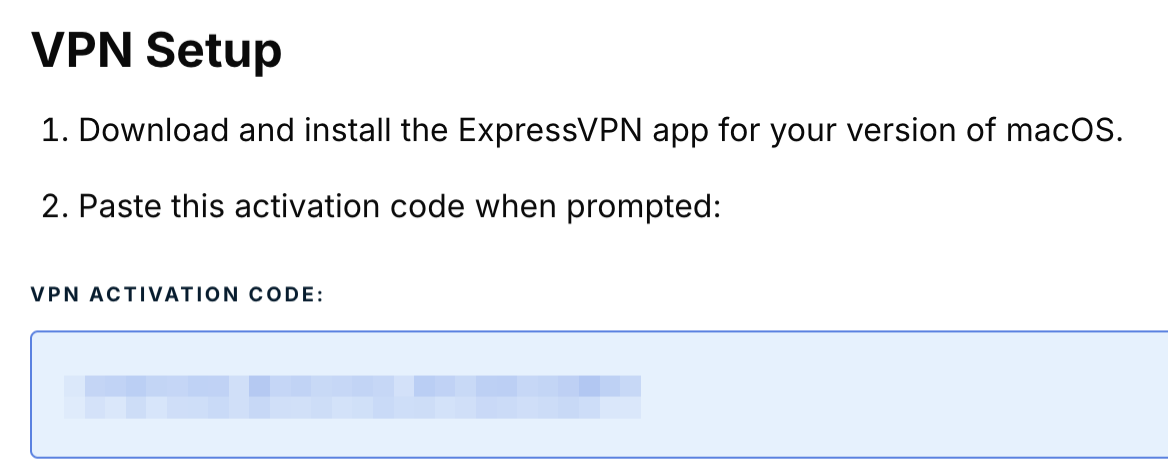
Bu tarayıcı penceresini açık tutun. Kurulum için aktivasyon koduna daha sonra ihtiyacınız olacak.

Click the activation code in the box to copy it to your clipboard.

3. VPN uygulamasını kurun

ExpressVPN uygulamanız için uygun kurulum yönergesine bakın:

  • Windows için ExpressVPN
  • Mac için ExpressVPN
  • Linux için ExpressVPN

Yardıma mı ihtiyacınız var? Anında yardım için ExpressVPN Destek Ekibi ile iletişime geçin.

En başa dön


ExpressVPN’i Android’e indirin ve kurun

Aşağıdaki adımlar, Android mobil cihazlar ve Chromebook gibi Android tabanlı cihazlar için geçerlidir.

1. VPN uygulamasını indirin

Google Play Store veya Galaxy Store’da ExpressVPN‘i arayın. Yükle‘ye dokunun.

Önemli: Android mobil cihazınızda Google Play Store veya Galaxy Store’a erişemiyorsanız APK’yı doğrudan cihazınıza indirin.

2. VPN uygulamasını kurun

Android için ExpressVPN kurulum yönergelerine bakın.

Yardıma mı ihtiyacınız var? Anında yardım için ExpressVPN Destek Ekibi ile iletişime geçin.

En başa dön


ExpressVPN’i iOS’a indirin ve kurun

1. VPN uygulamasını indirin

App Store’da ExpressVPN‘i arayın. İNDİR‘e dokunun.

Tap "GET."

Önemli: App Store’da ExpressVPN’i göremiyorsanız ExpressVPN’in mevcut olduğu bir konum ile App Store’unuzun konumunu değiştirmeniz gerekir.

2. VPN uygulamasını kurun

iOS için ExpressVPN kurulum yönergelerine bakın.

Yardıma mı ihtiyacınız var? Anında yardım için ExpressVPN Destek Ekibi ile iletişime geçin.

En başa dön


ExpressVPN’i yönlendiricilere indirin ve kurun

Önemli: Yönlendiriciler için ExpressVPN, seçili Asus, Linksys ve Netgear yönlendiricilerle uyumludur.

Uyumlu bir yönlendirici modeliniz varsa buna ExpressVPN’i nasıl indirip kuracağınızı öğrenin.

Yardıma mı ihtiyacınız var? Anında yardım için ExpressVPN Destek Ekibi ile iletişime geçin.

En başa dön


Herhangi bir cihazda ExpressVPN’de nasıl oturum açılır

Bu cihazlarda ExpressVPN’e giriş yapmak için şunlara ihtiyacınız olacak:

  • E-posta adresiniz
  • Aktivasyon kodu (Windows, Mac veya yönlendiriciler için ExpressVPN uygulaması için) )

ExpressVPN uygulamasını etkinleştirmeyle ilgili sorunlarınız varsa bu sorun giderme kılavuzuna bakın.

Yardıma mı ihtiyacınız var? Anında yardım için ExpressVPN Destek Ekibi ile iletişime geçin.

En başa dön

Share in FacebookShare in TwitterShare in WhatsappShare in TelegramShare by email
Bu yazı faydalı oldu mu?

Bunu duyduğumuza üzüldük. Nasıl geliştirebileceğimiz hakkında bizi bilgilendirin.

Please enter a valid email address.

Destek Ekibimizden bir üyemiz sorununuzla ilgili sizinle iletişime geçecek.

Share in FacebookShare in TwitterShare in WhatsappShare in TelegramShare by email
  • Tüm Cihazlar için VPN
  • ExpressVPN İndirin
  • MacOS
  • Windows PC
  • iOS (iPhone ve iPad)
  • Android
  • Linux
  • Yönlendiriciler
  • Apple TV
  • Fire Stick
  • Android TV
  • Chrome Uzantısı
  • VPN Sunucu Konumları
  • 105 Ülkede VPN Sunucusu
  • ABD VPN
  • Birleşik Krallık VPN
  • Kanada VPN
  • Avustralya VPN
  • Özellikler
  • Tüm Özellikleri Keşfedin
  • Risksiz VPN Denemesi
  • Planlar ve Ücretler
  • Ürünler
  • Keys Şifre Yöneticisi
  • Aircove Yönlendiriciler
  • ExpressVPN Hakkında
  • Hakkımızda
  • Güven Merkezi
  • Hak Merkezi
  • Güvenlik Denetimleri
  • ExpressVPN İncelemeleri
  • Uzmanlarımız
  • Medya
  • Kariyer
  • Programlar
  • Tottenham Hotspur
  • Bizimle Çalışın
  • Ortaklıklar
  • Fenomenler
  • Yardım Alın
  • Destek Merkezi
  • VPN Yükleme Öğreticileri
  • SSS
  • Bizimle İletişime Geçin
  • VPN Satın Alın
  • Geri Alma Kodunu Girin
  • Daha Fazla Bilgi
  • VPN Nedir?
  • IP Adresim Ne?
  • IP'mi gizle
  • VPN Kullanmak için 5 Sebep
  • Blog

© 2026 ExpressVPN. All rights reserved.

Gizlilik Politikası Hizmet Koşulları Cookie Preferences
Youtube Linkedin Twitter Facebook Instagram

Dil Seçin

  • English
  • Dansk
  • Deutsch
  • Español
  • Français
  • Italiano
  • Nederlands
  • Norsk
  • Polski
  • Português
  • Suomi
  • Svenska
  • Русский
  • ภาษาไทย
  • 한국어
  • 日本語

Live chat

Need help? Chat with us!

Online