



This guide will show you how to buy additional ExpressVPN for Teams licences.
To buy additional licenses:
- Sign into your ExpressVPN for Teams admin account.
- From your Admin Account Dashboard, select Add More Licenses.
- Choose the number of extra licenses you want, then select Continue to Payment.
- Review your Order summary and choose your preferred payment method.
- Select Confirm Subscription.
- If successful, you will see a message at the top of your Admin Account Dashboard stating “You have successfully purchased new licenses. Assign users now.”
Purchasing additional licenses may move your ExpressVPN for Teams account to the next discount tier, lowering your per license cost. You can see a breakdown of the discount tiers and per-license costs below.
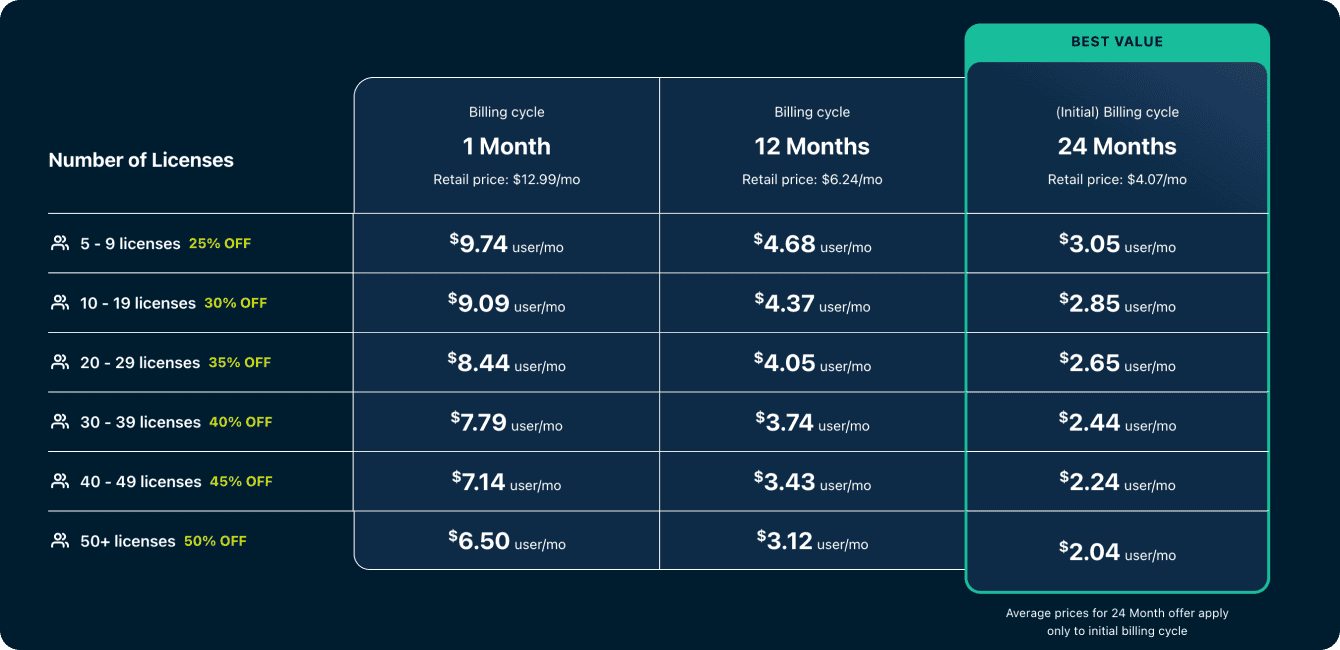
If your organization has moved to a new discount tier, your organization will receive a refund. This refund will either be credited to your payment method or credited to your next ExpressVPN for Teams purchase or renewal. You will receive an email detailing the exact refund along with additional information.
Need help? Contact the ExpressVPN Support Team for immediate assistance.