



This guide details how to customize the personality of ExpressAI’s models.
Important: In order to customize the personality of ExpressAI’s models, you must first set up a primary password.
Personalization enables you to customize how ExpressAI’s models respond to you. The personalization settings you set will apply to all the AI models supported by ExpressAI.
The personalization settings you apply are zero-access encrypted, meaning no one—not even ExpressVPN—can view this information.
Personalization changes the tone and style of the AI’s responses, but it does not bypass the models’ underlying capabilities or guardrails.
Jump to…
What can I personalize?
How to set up personalization settings on desktop
How to set up personalization settings on mobile
What can I personalize?
In ExpressAI, you can personalize:
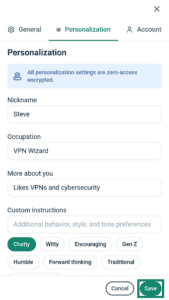
- Nickname: The name you want the AI models to refer to you by when responding to your prompts and conversations.
- Occupation: Let the AI models know what your occupation (job) is, for example: third-grade teacher, tax lawyer, fashion content creator, etc. ExpressAI will tailor responses based on your occupation.
- More about you: Here you can provide the AI models with more information about your hobbies, interests, values, or preferences when it comes to certain topics.
- Custom instructions: Adjust the tone, style, and behavior of how the AI models respond to your prompts and conversations. For example, you can ask the AI models to respond in a chatty tone or an encouraging tone.
Need help? Contact the ExpressAI Support Team for immediate assistance.
How to set up personalization settings on desktop
To set up your personalization settings on desktop:
- Click your email address in the top-right.


- Click My Account.


- Click the Personalization tab.


- Fill in the following fields:
- Nickname
- Occupation
- More about you
- Custom instructions


- Click Save.


Need help? Contact the ExpressAI Support Team for immediate assistance.
How to set up personalization settings on mobile
To set up your personalization settings on mobile:
- Tap

 .
.


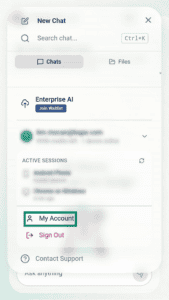
- Tap your email address.


- Tap My Account.

- Tap the Personalization tab.

- Fill in the following fields:
- Nickname
- Occupation
- More about you
- Custom instructions


- Tap Save.


Need help? Contact the ExpressAI Support Team for immediate assistance.