

• No-Logs Policy
    • Servers in 105 Countries
    • Use on Multiple Devices
    • High-Speed VPN
    • Access Online Services Securely
    • VPN for Gaming
    • 30-Day Money-Back Guarantee
    • Explore All Features
    • About ExpressVPN
    Sign Up For ExpressVPN

    One subscription gives you access to a fast-growing suite of privacy and security tools that work seamlessly together to improve your digital life.

    View all products
    • Lightway VPN Protocol
    • Internet Kill Switch
    • Split Tunneling
    • Private, Encrypted DNS
    • Avoid ISP Throttling
    • Threat Manager
    • Ad Blocker
    • Parental Controls
    • Dedicated IP
    • Windows
    • MacOS
    • Linux
    • iPhone / iPad
    • Android
    • Apple TV
    • Fire Stick
    • Android TV
    • VPN for Routers
    • Aircove Routers
    • Chrome
    • Firefox
    • Edge
    • All Apps & Devices
  • Pricing
    • What Is a VPN?
    • VPN for Beginners
    • How To Use a VPN
    • VPN Encryption Explained
    • Blog
    • Glossary
    • IP Address Checker
    • DNS Leak Test
    • WebRTC Leak Test
    • Password Generator
    • Support Center
    • FAQ
    • Live Chat
    • VPN Setup Tutorials
    • Redemption Code
  • VPN for Teams
    • ExpressVPN

      ExpressVPN Industry-leading, ultra-fast VPN with secure servers in 105 countries.

    • ExpressMailGuard

      ExpressMailGuard Private email relay service to protect your inbox and identity.

    • ExpressKeys

      ExpressKeys Secure password management, multi-factor authentication, and more.

    • ExpressAI

      ExpressAI The first consumer AI powered by confidential computing for privacy-led intelligence.

    • Identity Defender

      Identity Defender Powerful suite of ID protection, monitoring, and data removal tools.

    • View All Products

    Other products from the family behind ExpressVPN

    • holiday.com eSIM

      holiday.com eSIM Unlimited data with a single eSIM across 150+ destinations.

    • Intego

      Intego Award-winning macOS antivirus, firewall, system tools, and more.

    ExpressVPN for Teams
    ExpressVPN for Teams

    Get fast, secure VPN protection for growing teams. Easy to deploy, simple to manage, built to scale.

  • My Account
  • Neem Aircove Instellen
  • Nu proberen
  • Nu proberen Neem Aircove Instellen
  • Explore ExpressVPN
    • Why ExpressVPN?
    • No-Logs Policy
    • Servers in 105 Countries
    • Use on Multiple Devices
    • High-Speed VPN
    • Access Online Services Securely
    • VPN for Gaming
    • 30-Day Money-Back Guarantee
    • Explore All Features
    • About ExpressVPN
    • VPN Security & Access Features
    • Lightway VPN Protocol
    • Internet Kill Switch
    • Split Tunneling
    • Private, Encrypted DNS
    • Avoid ISP Throttling
    • Threat Manager
    • Ad Blocker
    • Parental Controls
    • Dedicated IP
  • Download VPN
    • Desktop
    • Windows
    • MacOS
    • Linux
    • Mobile
    • iPhone / iPad
    • Android
    • TV & Streaming
    • Apple TV
    • Fire Stick
    • Android TV
    • Routers
    • VPN for Routers
    • Aircove Routers
    • Extensions
    • Chrome
    • Firefox
    • Edge
    • All Apps & Devices
  • Pricing
  • Resources
    • VPN Basics
    • What Is a VPN?
    • VPN for Beginners
    • How To Use a VPN
    • VPN Encryption Explained
    • Content Library
    • Blog
    • Glossary
    • Tools
    • IP Address Checker
    • DNS Leak Test
    • WebRTC Leak Test
    • Password Generator
    • Support
    • Support Center
    • FAQ
    • Live Chat
    • VPN Setup Tutorials
    • Redemption Code
  • VPN for Teams
  • Products
    • ExpressVPN

      ExpressVPN Industry-leading, ultra-fast VPN with secure servers in 105 countries.

    • ExpressMailGuard

      ExpressMailGuard Private email relay service to protect your inbox and identity.

    • ExpressKeys

      ExpressKeys Secure password management, multi-factor authentication, and more.

    • ExpressAI

      ExpressAI The first consumer AI powered by confidential computing for privacy-led intelligence.

    • Identity Defender

      Identity Defender Powerful suite of ID protection, monitoring, and data removal tools.

    • View All Products

    Other products from the family behind ExpressVPN

    • holiday.com eSIM

      holiday.com eSIM Unlimited data with a single eSIM across 150+ destinations.

    • Intego

      Intego Award-winning macOS antivirus, firewall, system tools, and more.

    ExpressVPN for Teams
    ExpressVPN for Teams

    Get fast, secure VPN protection for growing teams. Easy to deploy, simple to manage, built to scale.

  • My Account
Home Home » Hoe vind je de standaard inloggegevens voor je router

Kenniscentrum

Hoe vind je de standaard inloggegevens voor je router

Laatst bijgewerkt: 1 oktober 2025

Share in FacebookShare in TwitterShare in WhatsappShare in TelegramShare by email

Om onze apps en configuraties te gebruiken moet je je eerst aanmelden voor een ExpressVPN-account.

Deze handleiding toont je hoe je de standaard inloggegevens kunt vinden voor Asus, Linksys en Netgear routers.

Spring naar…

Asus
Linksys
Netgear
ExpressVPN Aircove
ExpressVPN Aircove GO


Asus

Standaard netwerknaam en wachtwoord

Je kunt de standaard netwerknaam vinden naast 2.4GHz SSID en 5GHz SSID op de onderkant van je Asus-router.
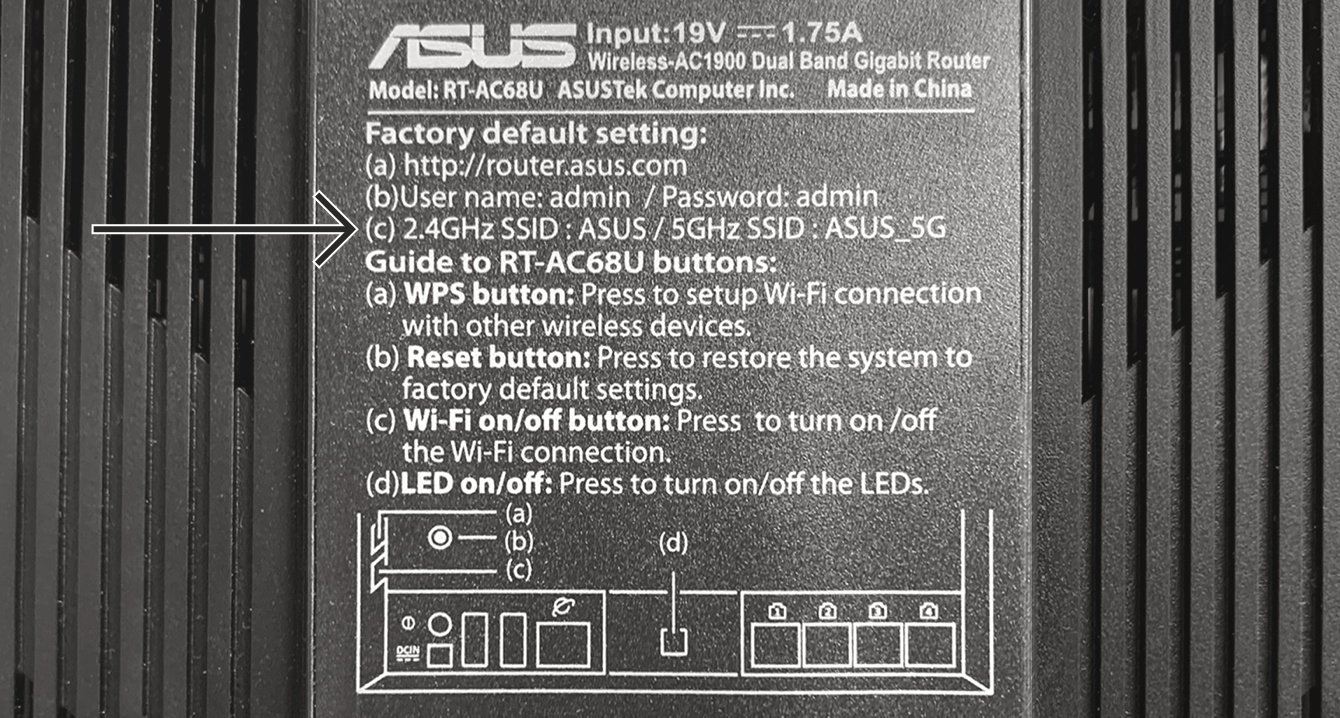
You can find the default network name at the bottom of your Asus router.
Je  kunt ook het standaard wachtwoord vinden naast PIN CODE. Het kan zijn dat deze informatie op een aparte sticker staat.

You can find the default network password on a separate label on your Asus router.

Als Pincode niet op je router is afgedrukt, kun je die vinden in de instellingen van je Asus-router:

  1. Om naar de instellingen van je Asus-router te gaan, typ je 192.168.1.1 in de adresbalk van je router. (Als het IP-adres van je router in het verleden is veranderd en je weet het niet meer, dan kun je het vinden in de instellingen van je apparaat.)
  2. Je kunt het standaard netwerkwachtwoord vinden onder PIN code.
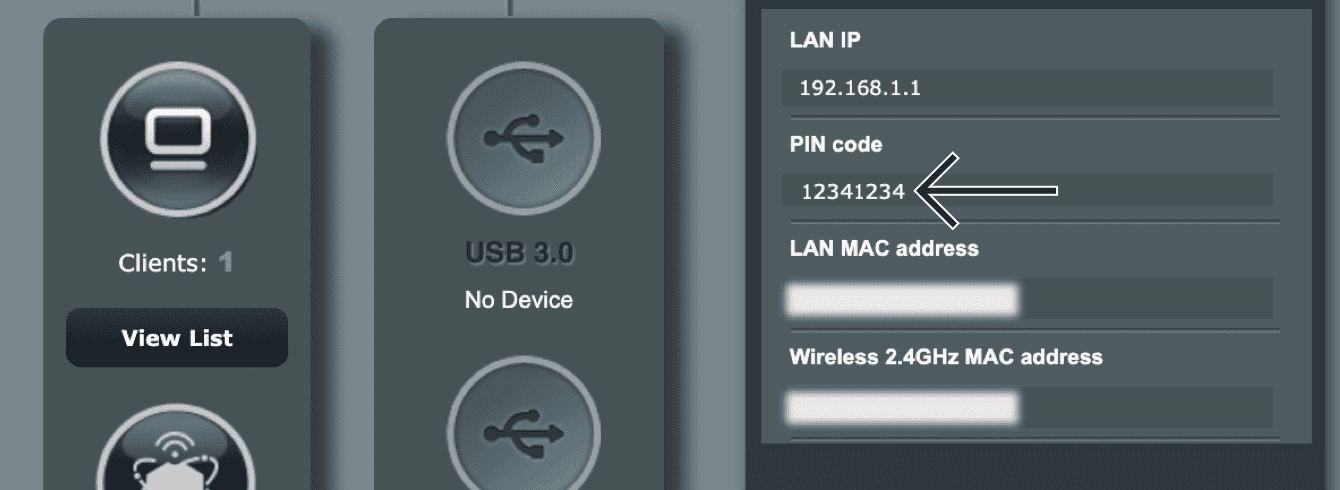
U kunt het standaard netwerkwachtwoord vinden onder "PIN code".

Als het niet lukt om in de instellingen van je router te komen, dan kun je de router resetten naar de fabrieksinstellingen om je netwerkwachtwoord te resetten.

Standaard router admin wachtwoord

Om in te loggen op het ExpressVPN-routerdashboard wordt je gevraagd om je router admin wachtwoord in te voeren.

Je kunt het standaard router admin wachtwoord vinden op de onderkant van je Asus-router.
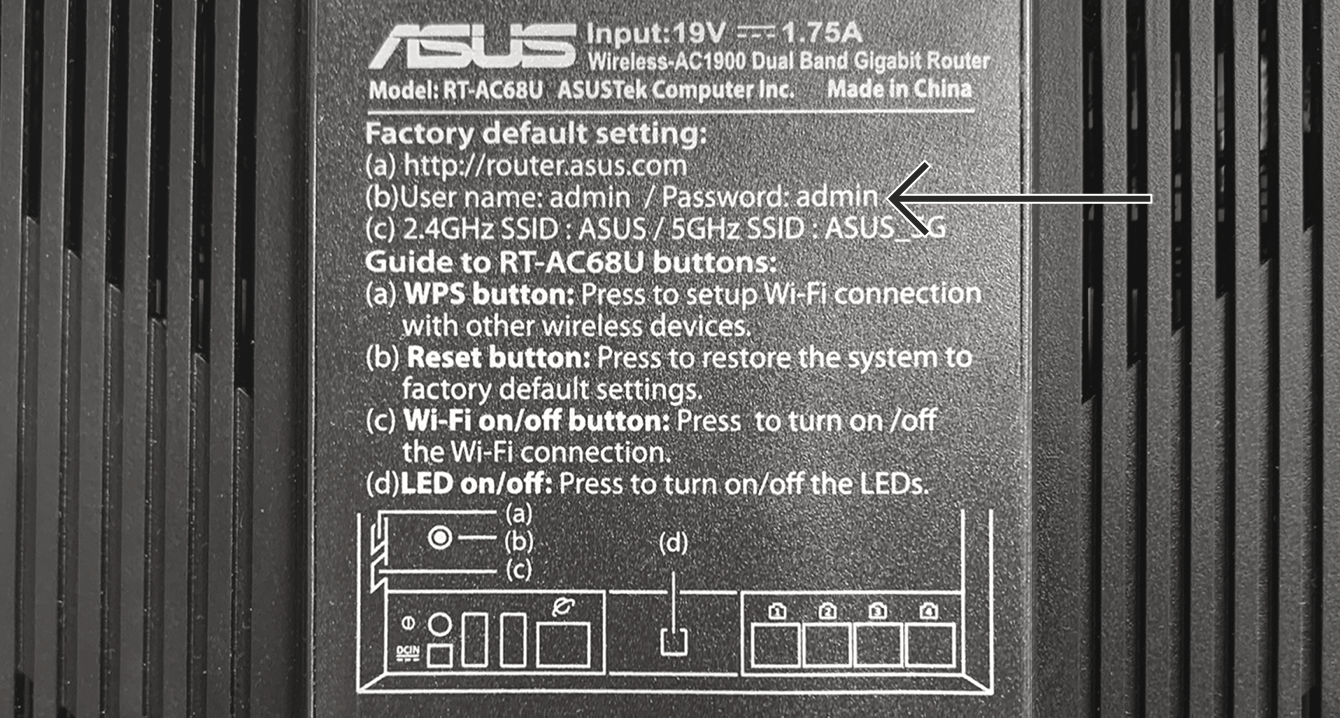
U kunt het standaard router admin wachtwoord vinden op de onderkant van uw Asus router.

Hulp nodig? Neem voor onmiddellijke ondersteuning contact op met de helpdesk van ExpressVPN.

Terug naar boven


Linksys

Standaard netwerknaam en wachtwoord

Je kunt de standaard netwerknaam vinden naast Wireless Network/Draadloos netwerk op de onderkant van je Linksys-router.
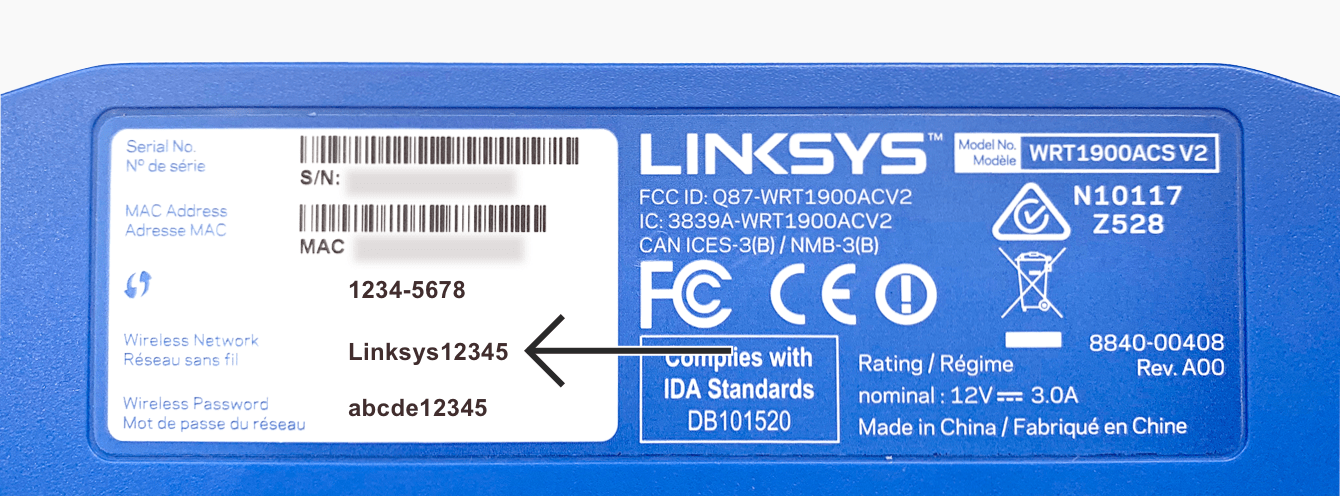
U kunt de standaard netwerknaam vindenop de onderkant van uw Linksys router.

Je kunt ook het standaard netwerkwachtwoord vinden naast Wireless Password/Draadloos wachtwoord op dezelfde sticker.
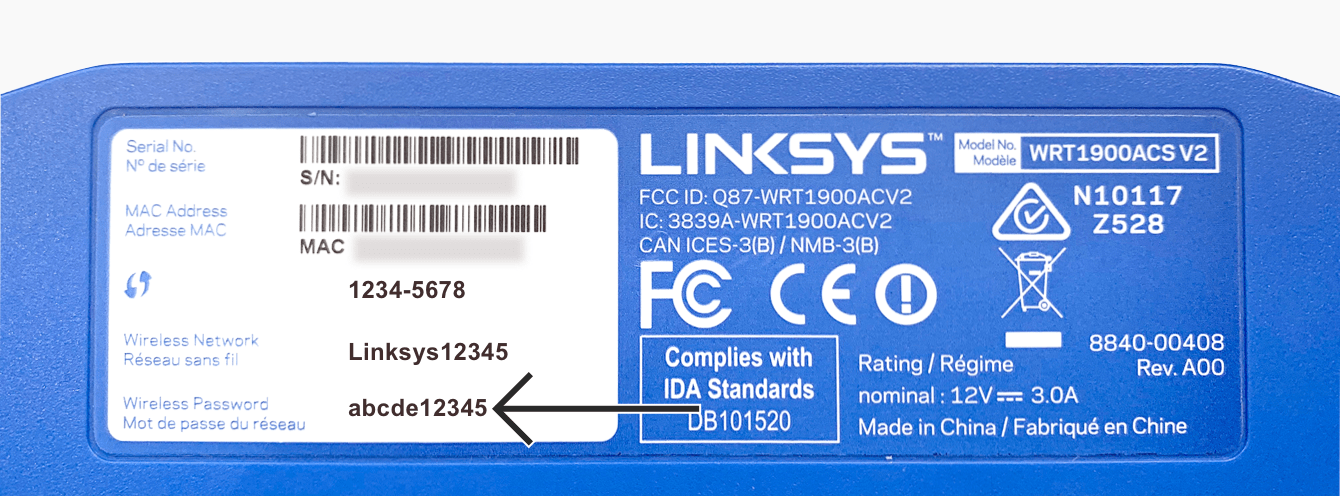
U kunt het standaard netwerkwachtwoord vinden op de onderkant van uw Linksys router.

Standaard router admin wachtwoord

Om in te loggen op het ExpressVPN-routerdashboard wordt je gevraagd om je router admin wachtwoord in te voeren.

Je  kunt het standaard router admin wachtwoord vinden op de onderkant van je Linksys-router.
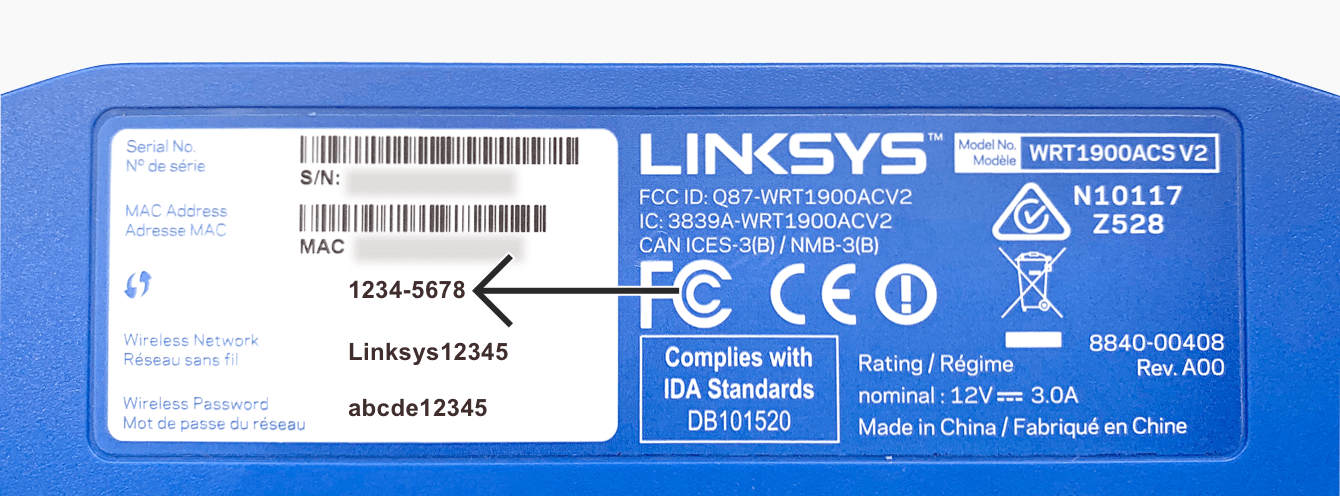
U kunt het standaard admin wachtwoord vinden op de onderkant van uw Linksys router.

Hulp nodig? Neem voor onmiddellijke ondersteuning contact op met de helpdesk van ExpressVPN.

Terug naar boven


Netgear

Standaard neterknaam en wachtwoord

Je kunt de standaard netwerknaam vinden onder WiFi Network Name/Wifi netwerknaam (SSID) op de onderkant van je Netgear-router.
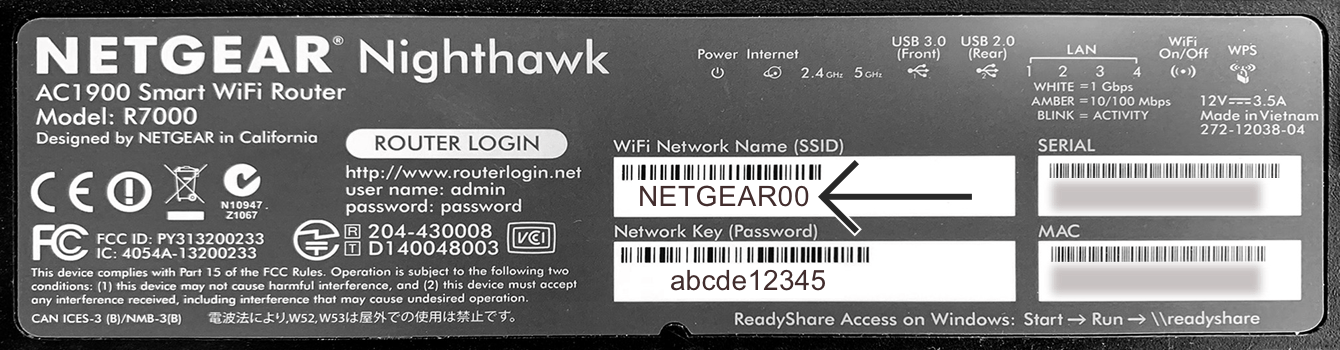
U kunt de standaard netwerknaam vinden op de onderkant van uw Netgear router.

Je kunt ook het standaard netwerkwachtwoord vinden onder Network Key (Password)/Netwerksleutel (Wachtwoord) op dezelfde sticker.
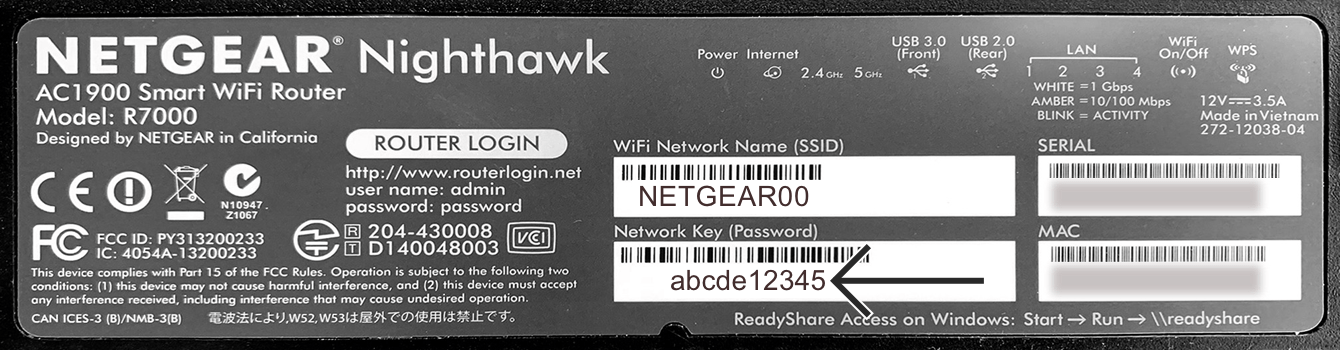
U kunt het standaard netwerkwachtwoord vinden op de onderkant van uw Netgear router.

Standaard router admin wachtwoord

Om in te loggen op het ExpressVPN router dashboard wordt je gevraagd je router admin wachtwoord in te voeren.

Je kunt het standaard router admin wachtwoord vinden naast Password/Wachtwoord op de onderkant van je Netgear-router.
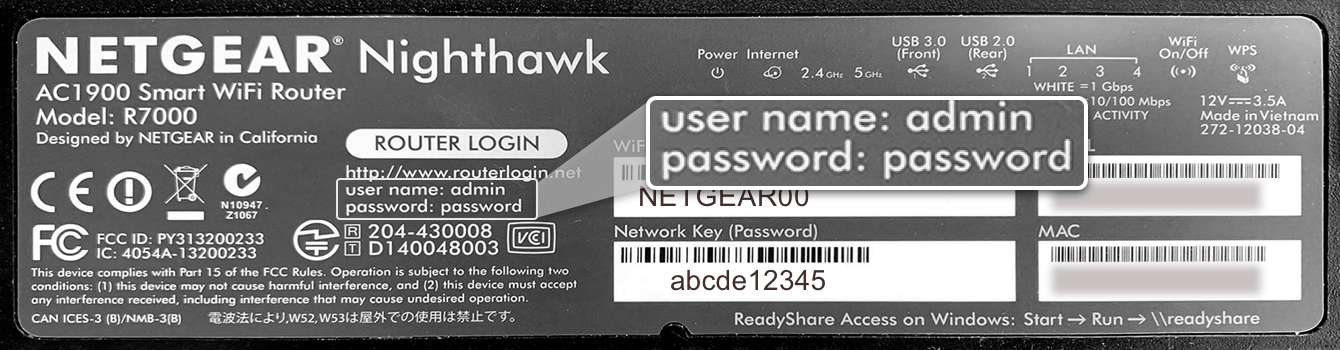
U kunt het standaard router admin wachtwoord vinden op de onderkant van uw Netgear router.

Hulp nodig? Neem voor onmiddellijke ondersteuning contact op met de helpdesk van ExpressVPN.

Terug naar boven


ExpressVPN Aircove

Je kunt je standaard Wifi-naam en wachtwoord vinden op de onderkant van de Aircove-router.


Als je bent ingelogd op de wifi ga je naar expressvpnrouter.com om de wifi-naam en het admin wachtwoord van je router te veranderen.

Hulp nodig? Neem voor onmiddellijke ondersteuning contact op met de helpdesk van ExpressVPN.

Terug naar boven


ExpressVPN Aircove Go

Je kunt je standaard Wi-Fi-naam en wachtwoord vinden op de onderkant van je Aircove Go.

Zodra je verbinding hebt gemaakt met het Wi-Fi-netwerk, kun je naar expressvpnrouter.com gaan om de instellingen van je router te configureren.

Hulp nodig? Neem voor onmiddellijke ondersteuning contact op met de helpdesk van ExpressVPN.

Terug naar boven

Share in FacebookShare in TwitterShare in WhatsappShare in TelegramShare by email
Heeft dit artikel je geholpen?

Het spijt ons dat te horen. Laat ons weten wat we kunnen verbeteren.

Please enter a valid email address.

Een van onze helpdeskmedewerkers gaat je punt oppakken.

Share in FacebookShare in TwitterShare in WhatsappShare in TelegramShare by email

Aanverwante artikelen

    Heeft dit artikel je geholpen?

    Het spijt ons dat te horen. Laat ons weten wat we kunnen verbeteren.

    Please enter a valid email address.

    Een van onze helpdeskmedewerkers gaat je punt oppakken.

    • VPN voor alle apparaten
    • Download ExpressVPN
    • MacOS
    • Windows PC
    • iOS (iPhone en iPad)
    • Android
    • Linux
    • Routers
    • Apple TV
    • Fire Stick
    • Android TV
    • Chrome-extensie
    • VPN-servers
    • Servers in 105 landen
    • VPN VS
    • VPN VK
    • VPN Canada
    • VPN Australië
    • Functies
    • Alle functies bekijken
    • Probeer VPN: gratis annuleren
    • Abonnementen en prijzen
    • Producten
    • Keys wachtwoordmanager
    • Aircove-routers
    • Over ExpressVPN
    • Over ons
    • Privacy- en veiligheidscentrum
    • Rechtencentrum
    • Veiligheidsaudits
    • ExpressVPN-reviews
    • Onze experts
    • Pers
    • Werken bij ExpressVPN
    • Programmer
    • Tottenham Hotspur
    • Partner worden
    • Affiliates
    • Influencere
    • Hulp vragen
    • Helpdesk
    • VPN-handleidingen
    • Veelgestelde vragen
    • Contact opnemen
    • Neem een VPN
    • Kortingscode inwisselen
    • Lees meer
    • Wat is een VPN?
    • Wat is mijn IP-adres?
    • Verberg mijn IP
    • 5 voordelen van een VPN
    • Blog

    IPHONE/IPAD
    ANDROID
    MAC
    WINDOWS
    APPLE TV
    CHROME
    VPN SERVER
    DOWNLOAD

    © 2026 ExpressVPN. Alle rechten voorbehouden.

    Privacybeleid Gebruiksvoorwaarden Cookie Preferences
    Youtube Linkedin Twitter Facebook Instagram

    Kies een taal

    • English
    • Dansk
    • Deutsch
    • Español
    • Français
    • Italiano
    • Norsk
    • Polski
    • Português
    • Suomi
    • Svenska
    • Türkçe
    • Русский
    • ภาษาไทย
    • 한국어
    • 日本語

    Live chat

    Need help? Chat with us!

    Online