• No-Logs Policy
    • Servers in 105 Countries
    • Use on Multiple Devices
    • High-Speed VPN
    • Access Online Services Securely
    • VPN for Gaming
    • 30-Day Money-Back Guarantee
    • Explore All Features
    • About ExpressVPN
    Sign Up For ExpressVPN

    One subscription gives you access to a fast-growing suite of privacy and security tools that work seamlessly together to improve your digital life.

    View all products
    • Lightway VPN Protocol
    • Internet Kill Switch
    • Split Tunneling
    • Private, Encrypted DNS
    • Avoid ISP Throttling
    • Threat Manager
    • Ad Blocker
    • Parental Controls
    • Dedicated IP
    • Windows
    • MacOS
    • Linux
    • iPhone / iPad
    • Android
    • Apple TV
    • Fire Stick
    • Android TV
    • VPN for Routers
    • Aircove Routers
    • Chrome
    • Firefox
    • Edge
    • All Apps & Devices
  • Pricing
    • What Is a VPN?
    • VPN for Beginners
    • How To Use a VPN
    • VPN Encryption Explained
    • Blog
    • Glossary
    • IP Address Checker
    • DNS Leak Test
    • WebRTC Leak Test
    • Password Generator
    • Support Center
    • FAQ
    • Live Chat
    • VPN Setup Tutorials
    • Redemption Code
  • VPN for Teams
    • ExpressVPN

      ExpressVPN Industry-leading, ultra-fast VPN with secure servers in 105 countries.

    • ExpressMailGuard

      ExpressMailGuard Private email relay service to protect your inbox and identity.

    • ExpressKeys

      ExpressKeys Secure password management, multi-factor authentication, and more.

    • ExpressAI

      ExpressAI The first consumer AI powered by confidential computing for privacy-led intelligence.

    • Identity Defender

      Identity Defender Powerful suite of ID protection, monitoring, and data removal tools.

    • View All Products

    Other products from the family behind ExpressVPN

    • holiday.com eSIM

      holiday.com eSIM Unlimited data with a single eSIM across 150+ destinations.

    • Intego

      Intego Award-winning macOS antivirus, firewall, system tools, and more.

    ExpressVPN for Teams
    ExpressVPN for Teams

    Get fast, secure VPN protection for growing teams. Easy to deploy, simple to manage, built to scale.

  • My Account
  • Aircoveを入手する はじめる
  • プランを見る
  • プランを見る Aircoveを入手する はじめる
  • Explore ExpressVPN
    • Why ExpressVPN?
    • No-Logs Policy
    • Servers in 105 Countries
    • Use on Multiple Devices
    • High-Speed VPN
    • Access Online Services Securely
    • VPN for Gaming
    • 30-Day Money-Back Guarantee
    • Explore All Features
    • About ExpressVPN
    • VPN Security & Access Features
    • Lightway VPN Protocol
    • Internet Kill Switch
    • Split Tunneling
    • Private, Encrypted DNS
    • Avoid ISP Throttling
    • Threat Manager
    • Ad Blocker
    • Parental Controls
    • Dedicated IP
  • Download VPN
    • Desktop
    • Windows
    • MacOS
    • Linux
    • Mobile
    • iPhone / iPad
    • Android
    • TV & Streaming
    • Apple TV
    • Fire Stick
    • Android TV
    • Routers
    • VPN for Routers
    • Aircove Routers
    • Extensions
    • Chrome
    • Firefox
    • Edge
    • All Apps & Devices
  • Pricing
  • Resources
    • VPN Basics
    • What Is a VPN?
    • VPN for Beginners
    • How To Use a VPN
    • VPN Encryption Explained
    • Content Library
    • Blog
    • Glossary
    • Tools
    • IP Address Checker
    • DNS Leak Test
    • WebRTC Leak Test
    • Password Generator
    • Support
    • Support Center
    • FAQ
    • Live Chat
    • VPN Setup Tutorials
    • Redemption Code
  • VPN for Teams
  • Products
    • ExpressVPN

      ExpressVPN Industry-leading, ultra-fast VPN with secure servers in 105 countries.

    • ExpressMailGuard

      ExpressMailGuard Private email relay service to protect your inbox and identity.

    • ExpressKeys

      ExpressKeys Secure password management, multi-factor authentication, and more.

    • ExpressAI

      ExpressAI The first consumer AI powered by confidential computing for privacy-led intelligence.

    • Identity Defender

      Identity Defender Powerful suite of ID protection, monitoring, and data removal tools.

    • View All Products

    Other products from the family behind ExpressVPN

    • holiday.com eSIM

      holiday.com eSIM Unlimited data with a single eSIM across 150+ destinations.

    • Intego

      Intego Award-winning macOS antivirus, firewall, system tools, and more.

    ExpressVPN for Teams
    ExpressVPN for Teams

    Get fast, secure VPN protection for growing teams. Easy to deploy, simple to manage, built to scale.

  • My Account
Home Home » LinksysルーターでのMediaStreamerの設定方法

設定チュートリアル

LinksysルーターでのMediaStreamerの設定方法

最終更新: 2025/03/05

Share in FacebookShare in TwitterShare in WhatsappShare in TelegramShare by email
Get ExpressVPN on your router.
ルーターにVPNが必要ですか?
今すぐExpressVPNを購入する

Refer a friend to use ExpressVPN.
ExpressVPNを気に入りましたか?1ヶ月の無料サービスを獲得しよう
今すぐ友達に紹介
高速で安全なVPNの設定をお探しですか? Linksys EA6200、WRT1200AC、WRT1900AC 13J1、WRT1900AC 13J2、WRT1900ACS、またはWRT1900ACS V2をお持ちの場合は、ExpressVPNアプリをルーター用に設定できます。

MediaStreamerは、ストリーミング体験を向上させるために設計されたDNSサービスです。 デバイスがネイティブにVPNをサポートしていない場合、MediaStreamerはストリーミングの優れた代替手段です。

MediaStreamerをスムーズに使用するには、ExpressVPNのウェブサイトでIPアドレスを登録する必要があります。 これにより、ExpressVPNがあなたのIPアドレスを認識し、デバイスにMediaStreamerへのアクセスを許可します。

注意: MediaStreamerはVPNではなく、VPNのプライバシーとセキュリティの利点を提供しません。 MediaStreamerではロケーションを変更することはできません。

以下の手順はLinksys WRT3200 ACMでテストされています。

…に移動…

1. ExpressVPNのウェブサイトでIPアドレスを登録
2. MediaStreamerのIPアドレスを取得
3. LinksysルーターのDNS設定を変更


1. ExpressVPNのウェブサイトでIPアドレスを登録

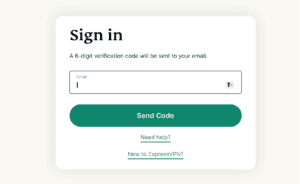
ExpressVPN DNS設定ページにアクセスしてください。 求められた場合は、ExpressVPNの資格情報を入力し、サインインをクリックしてください。

アカウントの資格情報を入力し、「サインイン」をクリックしてください。

メールに送信された認証コードを入力します。

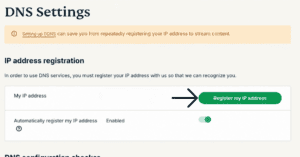
IPアドレス登録の下で、IPアドレスを登録をクリックします。 もしIPアドレスの横に「登録済み」と表示されている場合、このオプションを再度選択する必要はありません。

「私のIPアドレス」の横で「IPアドレスを登録」をクリックします。

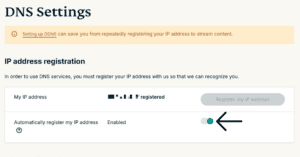
IPアドレスの自動登録をオンにします。 これは、IPアドレスの変更を自動的に追跡するので推奨されます。

「IPアドレスの自動登録」をオンにします。

IPアドレスの自動登録が有効になっている場合は、ExpressVPNアプリをデバイスで使用するか、定期的にExpressVPNアカウントにサインインすることで、IPアドレスを最新の状態に保つことができます。

何かお困りですか? ここをクリックしてExpressVPNサポートチームにライブチャットで連絡してください

ページのトップに戻る


2. MediaStreamerのIPアドレスを取得

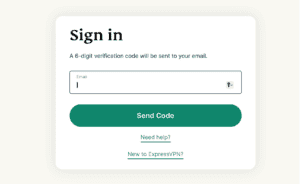
ExpressVPNセットアップページにアクセスしてください。 求められた場合は、ExpressVPNの資格情報を入力し、サインインをクリックしてください。

アカウントの資格情報を入力し、「サインイン」をクリックしてください。

メールに送信された認証コードを入力します。

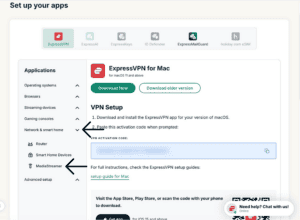
右側に、MediaStreamer DNSサーバーのIPアドレスが表示されます。

「MediaStreamerの設定」の下で、MediaStreamerのIPアドレスが見つかります。

このブラウザウィンドウを開いたままにしておいてください。 設定のためにこの情報が後で必要になります。

何かお困りですか? ここをクリックしてExpressVPNサポートチームにライブチャットで連絡してください

ページのトップに戻る


3. LinksysルーターのDNS設定を変更

ルーターの管理パネルにアクセスするには、ウェブブラウザで192.168.1.1に移動してください。 ユーザー名とパスワードでサインインします(デフォルトでは、どちらもadminです)。

以前、ルーターのIPアドレスを変更した場合、そのアドレスを忘れてしまったら、デバイスの設定で見つけられます。

左側のサイドバーで接続性をクリックします。

ルーターの管理パネルで、「接続性」をクリックします。

上部のナビゲーションバーで、ローカルネットワークをクリックします。

「ローカルネットワーク」をクリックします。

スタティックDNS 1 および スタティックDNS 2には、以前に見つけたMediaStreamerのIPアドレスを入力します。 Apply をクリックします。

「適用」をクリックします。

何かお困りですか? ここをクリックしてExpressVPNサポートチームにライブチャットで連絡してください

ページのトップに戻る

Share in FacebookShare in TwitterShare in WhatsappShare in TelegramShare by email
この記事は役立ちましたか?

ご不便をおかけして申し訳ございません。よろしければ、今後の改善策をお聞かせください。

Which router model do you need help with?

Examples: Linksys WRT1200AC, Asus RT-AC56R

Please enter a valid email address.

サポートチームのメンバーがこの問題についてフォローアップいたします。

Share in FacebookShare in TwitterShare in WhatsappShare in TelegramShare by email
  • 各デバイス対応のVPN
  • ExpressVPNのダウンロード
  • MacOS
  • Windows PC
  • iOS (iPhone & iPad)
  • Android
  • Linux
  • ルーター
  • Apple TV
  • Fire Stick
  • Android TV
  • Chrome拡張機能
  • VPNサーバーロケーション
  • 105ヶ国のサーバー
  • アメリカ対応VPN
  • イギリス対応VPN
  • カナダ対応VPN
  • オーストラリア対応VPN
  • 特徴
  • 全ての機能を見る
  • VPNトライアル
  • プランと価格
  • プロダクト
  • Keysパスワードマネージャー
  • Aircoveルーター
  • ExpressVPNについて
  • 弊社について
  • 信頼できるVPNへの取り組み
  • デジタルの権利
  • セキュリティ監査
  • ExpressVPNのレビュー
  • 弊社のエキスパートたち
  • プレス
  • 採用
  • プログラム
  • トッテナム・ホットスパー
  • パートナー
  • アフィリエイト
  • インフルエンサー
  • サポート
  • サポートセンター
  • VPN設定方法
  • よくある質問 (FAQ)
  • お問い合わせ
  • VPNを購入する
  • 引き換えコードを入力
  • 詳しく知る
  • VPNとは?
  • 自分のIPアドレスを調べる
  • 私のIPを隠す
  • VPN用途トップ5
  • ブログ

© 2026 ExpressVPN. All rights reserved.(無断転載および引用禁止)

プライバシーポリシー 利用規約 Cookie Preferences
Youtube Linkedin Twitter Facebook Instagram

言語を選択してください

  • English
  • Dansk
  • Deutsch
  • Español
  • Français
  • Italiano
  • Nederlands
  • Norsk
  • Polski
  • Português
  • Suomi
  • Svenska
  • Türkçe
  • Русский
  • ภาษาไทย
  • 한국어

Live chat

Need help? Chat with us!

Online