

• No-Logs Policy
    • Servers in 105 Countries
    • Use on Multiple Devices
    • High-Speed VPN
    • Access Online Services Securely
    • VPN for Gaming
    • 30-Day Money-Back Guarantee
    • Explore All Features
    • About ExpressVPN
    Sign Up For ExpressVPN

    One subscription gives you access to a fast-growing suite of privacy and security tools that work seamlessly together to improve your digital life.

    View all products
    • Lightway VPN Protocol
    • Internet Kill Switch
    • Split Tunneling
    • Private, Encrypted DNS
    • Avoid ISP Throttling
    • Threat Manager
    • Ad Blocker
    • Parental Controls
    • Dedicated IP
    • Windows
    • MacOS
    • Linux
    • iPhone / iPad
    • Android
    • Apple TV
    • Fire Stick
    • Android TV
    • VPN for Routers
    • Aircove Routers
    • Chrome
    • Firefox
    • Edge
    • All Apps & Devices
  • Pricing
    • What Is a VPN?
    • VPN for Beginners
    • How To Use a VPN
    • VPN Encryption Explained
    • Blog
    • Glossary
    • IP Address Checker
    • DNS Leak Test
    • WebRTC Leak Test
    • Password Generator
    • Support Center
    • FAQ
    • Live Chat
    • VPN Setup Tutorials
    • Redemption Code
  • VPN for Teams
    • ExpressVPN

      ExpressVPN Industry-leading, ultra-fast VPN with secure servers in 105 countries.

    • ExpressMailGuard

      ExpressMailGuard Private email relay service to protect your inbox and identity.

    • ExpressKeys

      ExpressKeys Secure password management, multi-factor authentication, and more.

    • ExpressAI

      ExpressAI The first consumer AI powered by confidential computing for privacy-led intelligence.

    • Identity Defender

      Identity Defender Powerful suite of ID protection, monitoring, and data removal tools.

    • View All Products

    Other products from the family behind ExpressVPN

    • holiday.com eSIM

      holiday.com eSIM Unlimited data with a single eSIM across 150+ destinations.

    • Intego

      Intego Award-winning macOS antivirus, firewall, system tools, and more.

    ExpressVPN for Teams
    ExpressVPN for Teams

    Get fast, secure VPN protection for growing teams. Easy to deploy, simple to manage, built to scale.

  • My Account
  • Aircoveを入手する はじめる
  • プランを見る
  • プランを見る Aircoveを入手する はじめる
  • Explore ExpressVPN
    • Why ExpressVPN?
    • No-Logs Policy
    • Servers in 105 Countries
    • Use on Multiple Devices
    • High-Speed VPN
    • Access Online Services Securely
    • VPN for Gaming
    • 30-Day Money-Back Guarantee
    • Explore All Features
    • About ExpressVPN
    • VPN Security & Access Features
    • Lightway VPN Protocol
    • Internet Kill Switch
    • Split Tunneling
    • Private, Encrypted DNS
    • Avoid ISP Throttling
    • Threat Manager
    • Ad Blocker
    • Parental Controls
    • Dedicated IP
  • Download VPN
    • Desktop
    • Windows
    • MacOS
    • Linux
    • Mobile
    • iPhone / iPad
    • Android
    • TV & Streaming
    • Apple TV
    • Fire Stick
    • Android TV
    • Routers
    • VPN for Routers
    • Aircove Routers
    • Extensions
    • Chrome
    • Firefox
    • Edge
    • All Apps & Devices
  • Pricing
  • Resources
    • VPN Basics
    • What Is a VPN?
    • VPN for Beginners
    • How To Use a VPN
    • VPN Encryption Explained
    • Content Library
    • Blog
    • Glossary
    • Tools
    • IP Address Checker
    • DNS Leak Test
    • WebRTC Leak Test
    • Password Generator
    • Support
    • Support Center
    • FAQ
    • Live Chat
    • VPN Setup Tutorials
    • Redemption Code
  • VPN for Teams
  • Products
    • ExpressVPN

      ExpressVPN Industry-leading, ultra-fast VPN with secure servers in 105 countries.

    • ExpressMailGuard

      ExpressMailGuard Private email relay service to protect your inbox and identity.

    • ExpressKeys

      ExpressKeys Secure password management, multi-factor authentication, and more.

    • ExpressAI

      ExpressAI The first consumer AI powered by confidential computing for privacy-led intelligence.

    • Identity Defender

      Identity Defender Powerful suite of ID protection, monitoring, and data removal tools.

    • View All Products

    Other products from the family behind ExpressVPN

    • holiday.com eSIM

      holiday.com eSIM Unlimited data with a single eSIM across 150+ destinations.

    • Intego

      Intego Award-winning macOS antivirus, firewall, system tools, and more.

    ExpressVPN for Teams
    ExpressVPN for Teams

    Get fast, secure VPN protection for growing teams. Easy to deploy, simple to manage, built to scale.

  • My Account
Home Home » RokuにExpressVPNを設定する方法

設定チュートリアル

RokuにExpressVPNを設定する方法

最終更新: 2023/05/15

Share in FacebookShare in TwitterShare in WhatsappShare in TelegramShare by email

弊社のアプリと設定を使用するには、まずExpressVPNアカウントに登録してください。

このチュートリアルでは、RokuまたはRoku ExpressにExpressVPNを設定する方法を説明します。

RokuデバイスはネイティブにはVPNをサポートしていません。ExpressVPNをRokuデバイスで使用するには、ルーター版ExpressVPNアプリ、ルーターへのExpressVPN手動設定、または仮想VPNルーターを使用して、VPN接続を設定できます。

このチュートリアルを進める前に、有効なExpressVPNサブスクリプションが必要です。

これらの手順は、Roku ExpressとRoku 3でテストされました。他のRokuデバイスでも同じように動作します。

セクションにジャンプ…

1. VPNルーターまたは仮想VPNルーターを設定する
2. RokuデバイスおよびRokuアカウントを設定する
Rokuを使ってデバイスからテレビにキャスティングまたはミラーリングする


1. VPNルーターまたは仮想VPNルーターを設定する

RokuデバイスでExpressVPNを使用するには、ルーター版ExpressVPNアプリ、ルーター向けExpressVPN手動設定、または仮想VPNルーターを使用してVPN接続を設定します。

ルーターでExpressVPNアプリを使用する

重要:このオプションには、互換性のあるAsus、Linksys、Netgearルーターが必要です。

Asus、Linksys、NetgearルーターでExpressVPNルーターアプリを使用できます。

設定インストラクションをご覧ください。

  • Asus版ExpressVPNアプリ
  • Linksys版ExpressVPNアプリ
  • Netgear版ExpressVPNアプリ

ルーターでExpressVPN手動設定を利用

重要:このオプションを行うには、ExpressVPN手動設定と互換性のあるルーターが必要です。

ExpressVPN手動設定は、これらのルーターで設定できます。

仮想VPNルーターの使用

重要:このオプションを行うには技術的な知識が必要なため、万人向けではありません。

仮想VPNルーターは、Windowsで設定できます。

ヘルプが必要ですか?ExpressVPNサポートチームに連絡して迅速なヘルプをお受けください。

トップに戻る


2. RokuデバイスおよびRokuアカウントを設定する

最高のストリーミング体験を得るためには、Rokuデバイスを使うVPNルーター(または仮想VPNルーター)と同じ場所にあるRokuアカウントを使用する必要があります。(アカウントの位置情報はアカウント設定時に使用したデバイスのIPアドレスに基づきます。)

もしこれが、お使いのRokuデバイスを設定する最初の機会である場合には、これらのインストラクションに従って、RokuデバイスおよびRokuアカウントを設定してください。

Rokuデバイスの設定は完了していて、VPNルーター(または仮想VPNルーター)とは別の場所にあるRokuアカウントにサインインしている場合は、以下の手順でファクトリーリセットを行い、Rokuアカウントからサインアウトしてください。

  1. 設定 > システム > 詳細システム設定を開く。
  2. ファクトリーリセットを選択する。
  3. 画面上のコードを入力して、OKを選択する。
  4. ファクトリーリセットの開始を選択する。
  5. Rokuデバイスを設定する。

Rokuデバイスの設定

お使いのRokuデバイスの設定手順に従ってください。Wi-Fiネットワークへの接続を求められたら、先に設定したVPNルーター(または仮想VPNルーター)を選択します。

Rokuデバイスにサインインするために、Rokuアカウントの作成を求められます。ストリーミングのためには、アカウントの位置情報が、先に設定して接続したVPNルーター(または仮想VPNルーター)の位置情報と一致している必要があります。

例えば、お使いのVPNルーター(または仮想VPNルーター)のサーバーの所在地が米国の場合、Rokuアカウントの位置情報も米国の同じ場所である必要があります(アカウントの位置情報は、アカウント設定に使用したデバイスのIPアドレスに基づいています)。

  • すでにRokuアカウントをお持ちで、そのアカウントの位置情報がVPNルーター(または仮想VPNルーター)の位置情報と同じである場合は、Rokuアカウントにサインインして、残りの設定手順に従ってください。
  • すでにRokuアカウントをお持ちので、アカウントの位置情報とVPNルーター(または仮想VPNルーター)の位置情報が異なる場合は、新たな位置情報を指定してRokuアカウントを作成することをお勧めします。
  • Rokuアカウントをお持ちでない場合は、VPNルーター(または仮想VPNルーター)と同じ位置情報にあるRokuアカウントを作成してください。

Roku登録ページで、ExpressVPNアプリを開き、VPNサーバーロケーションに接続します。このロケーションは、Rokuアカウントの所在地を決定し、VPNルーター(または仮想VPNルーター)の位置情報とも一致する必要があります。

ExpressVPN接続済み。

接続したら、ページを更新して、VPNロケーションが保存されていることを確認してください。詳細を記入し、画面の指示に従います。

Rokuアカウントを作成。

決済画面では、

  • 決済方法を入力する場合は、VPNルーター(または仮想VPNルーター)の設置場所と請求先が同じものを使用することをお勧めします。
  • 入力する適切なお支払い方法がない場合や、お支払い方法を入力したくない場合は、このステップをスキップを選択できます。
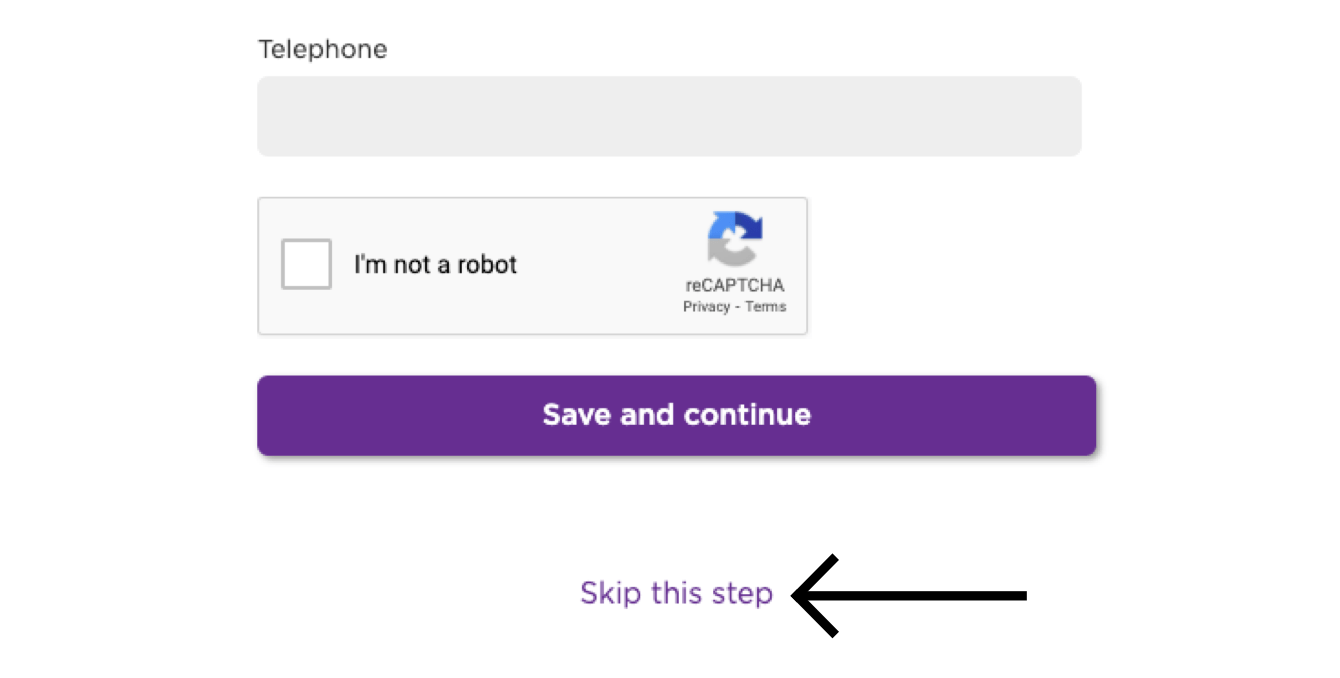
このステップをスキップをクリック

画面の指示に従って、設定を完了してください。

設定が完了したら、プライバシーとセキュリティを確保した状態で、Rokuでのストリーミングを開始できます。

ヘルプが必要ですか?ExpressVPNサポートチームに連絡して迅速なヘルプをお受けください。

トップに戻る


Rokuを使ってデバイスからテレビにキャスティングまたはミラーリング

キャスティングとミラーリングは、デバイスからRoku搭載テレビにコンテンツをストリーミングするためのワイヤレス技術です。

(VPNを使用しながら)デバイスからRoku経由でテレビにストリーミングしたい場合、対応するキャスティングとミラーリングのオプションは以下の通りです。

キャスティングミラーリング
Android(VPNを使用しながら)✘ 非対応✔ 対応
Windows(VPNを使用しながら)✘ 非対応✔ 対応
Chromebook(VPNを使用しながら)✘ 非対応✘ 非対応
Linux(VPNを使用しながら)✘ 非対応✘ 非対応

iOSやmacOSのコンテンツを、AirPlay 2に対応したRokuモデルにキャストまたはミラーリングできます。

または、RokuをVPNルーター、手動設定したVPNまたは、仮想VPNルーターに接続できます。このオプションでは、お持ちのデバイスからRokuへコンテンツのキャスティングやミラーリングを行う必要はありません。VPNに接続されたRokuがあればコンテンツをストリーミングできます。

ヘルプが必要ですか?ExpressVPNサポートチームに連絡して迅速なヘルプをお受けください。

トップに戻る

Share in FacebookShare in TwitterShare in WhatsappShare in TelegramShare by email
この記事は役立ちましたか?

ご不便をおかけして申し訳ございません。よろしければ、今後の改善策をお聞かせください。

Which Smart TV do you need help with?

Examples: Samsung Smart TV, LG Smart TV

Please enter a valid email address.

サポートチームのメンバーがこの問題についてフォローアップいたします。

Share in FacebookShare in TwitterShare in WhatsappShare in TelegramShare by email
  • 各デバイス対応のVPN
  • ExpressVPNのダウンロード
  • MacOS
  • Windows PC
  • iOS (iPhone & iPad)
  • Android
  • Linux
  • ルーター
  • Apple TV
  • Fire Stick
  • Android TV
  • Chrome拡張機能
  • VPNサーバーロケーション
  • 105ヶ国のサーバー
  • アメリカ対応VPN
  • イギリス対応VPN
  • カナダ対応VPN
  • オーストラリア対応VPN
  • 特徴
  • 全ての機能を見る
  • VPNトライアル
  • プランと価格
  • プロダクト
  • Keysパスワードマネージャー
  • Aircoveルーター
  • ExpressVPNについて
  • 弊社について
  • 信頼できるVPNへの取り組み
  • デジタルの権利
  • セキュリティ監査
  • ExpressVPNのレビュー
  • 弊社のエキスパートたち
  • プレス
  • 採用
  • プログラム
  • トッテナム・ホットスパー
  • パートナー
  • アフィリエイト
  • インフルエンサー
  • サポート
  • サポートセンター
  • VPN設定方法
  • よくある質問 (FAQ)
  • お問い合わせ
  • VPNを購入する
  • 引き換えコードを入力
  • 詳しく知る
  • VPNとは?
  • 自分のIPアドレスを調べる
  • 私のIPを隠す
  • VPN用途トップ5
  • ブログ

© 2026 ExpressVPN. All rights reserved.(無断転載および引用禁止)

プライバシーポリシー 利用規約 Cookie Preferences
Youtube Linkedin Twitter Facebook Instagram

言語を選択してください

  • English
  • Dansk
  • Deutsch
  • Español
  • Français
  • Italiano
  • Nederlands
  • Norsk
  • Polski
  • Português
  • Suomi
  • Svenska
  • Türkçe
  • Русский
  • ภาษาไทย
  • 한국어

Live chat

Need help? Chat with us!

Online